evilmarcie
about
Marceline is a Brisbane based game designer & developer with primary experience in Unity Engine (C#).Her work is deeply influenced by a lifelong love of literature & gothic horror. In the final weeks of her game design degree (concluding May 10), Marceline has been finalising a demo for a cozy bookshop simulator game, Little Library, which she has directed, designed, and developed alongside a small team of artists. In the background, she is also conceptualising & designing a gothic survival horror game that draws upon the classic gothic tales of Carmilla & Frankenstein.When she’s not building games, Marceline can be found buried in her books, or perhaps in her much beloved gothic themed Animal Crossing island.
favourite games
Favourite Genres: Horror, Cozy, Shop/Life Sim
software
Unity Engine (C#)
After Effects
Premiere Pro
Illustrator
Photoshop
Autodesk Maya
Blender
ToonBoom Harmony
Procreate
Aseprite
Canva
Figma
Microsoft Suite
++
education
Bachelor of Game Design
JMC Academy
2023 - May 2026
home
Little Library
Details will be updated alongside further development.
Last updated: 11/05/2026
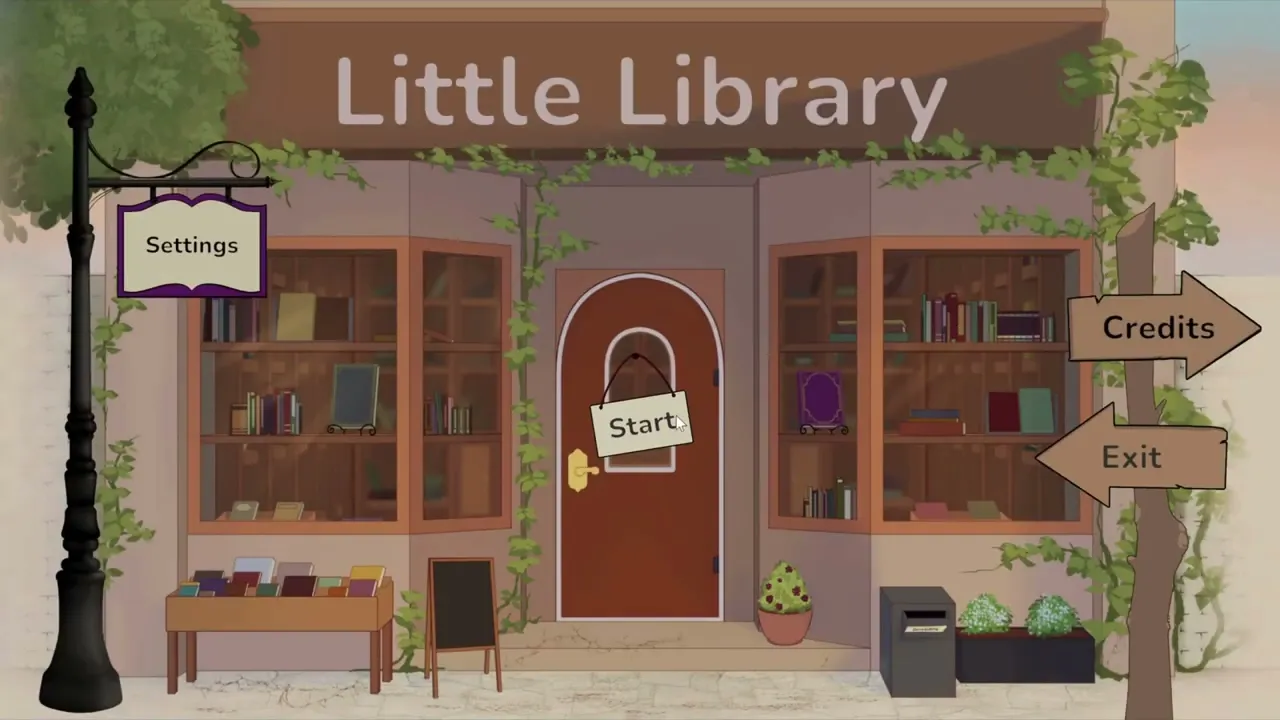
Welcome to Little Library!Manage your own cozy secondhand bookshop for classics
Organise your shelves & customise your display!
Learn from a library of 20 classic literature books
Get to know your 5 regular customers & create personalised recommendations based on their tastes!
Keep your regulars happy to maintain a high Customer Satisfaction rating
Little Library is a cozy bookshop simulator game themed around secondhand classic literature. Through organising shelves and recommending books to customers based on their preferences, the player is prompted to learn about a library of 20 classic literature books.The project begun as a final graduate project (October 2025 to May 2026), however development will be continued after the official project's completion.
Gameplay Cycle
Press images for enlarged view.
At the beginning of each day, the player will recieve a bookbox, which contains a randomised array of books. The player will then upack their delivery, free to arrange their books on their shelves in whatever method or system they choose (by genre, colour, completely random, etc). Once the box has been fully unpacked, the first customer will arrive.


After introducing themselves and their genre preferences, the customer will request that the player recommend them a book from their collection. To support the player in selecting a recommendation, the player has access to a "Database" menu, which contains helpful information on all books available, including the ability to sort books by a specific genre. Using the database as a reference, the player will pick a book to recommend to their customer.


The customer will then respond to the recommendation based on how well they feel the book in question is suited to their personal tastes, and the store's customer satisfaction rating is adjusted accordingly.


Each day, three different customers will visit the store to request recommendations. Once three customers have been served, the day will end, and progress to the next.

Credits
Marceline Lentz — director, producer, game designer, developerKelly Tran — lead artist, characters & environmentsKaitlyn Tullberg — book cover designJosh Whitmore — soundtrackRene Balson — UI art
Each sections listed will go into further detail into the primary systems within the game, and how each of them has been designed and implemented through code.See github for full scripts.
Project Postmortem
I am incredibly proud of where Little Library has ended up. This is by far my largest project to date, and my first time directing, designing and developing a "full" game, and it has been highly rewarding to watch a game I had envisioned coming to life.Due to the limited timeframe, there reached a point in the final stages of production where I had to begin prioritising the core elements of gameplay and fixing the most game breaking bugs. Thus, there are still a number of designed and proposed features, as well as a number of bugs (i have to keep reminding myself that this is to be expected but does still bring a level of disappointment) that are in the current game. I have no doubt that I will continue developing Little Library, even potentially reworking it with a better understanding of the systems and design.The project was a massive learning experience for me, with a significant number of features and systems being my first time developing anything of the kind, and required a lot of research and development. I am undoubtedly proud of how much I have achieved and learnt over the course of the project, however, I can now in hindsight, with the knowledge I have gained, see a number of flaws in the systems, particularly how they intersect, and would love to develop them far cleaner from the ground up. Now that I understand the systems required and how they function (as well as how to develop them), I can better design them and their interactions with one another.For example, the scene architecture I initially created (each area of the bookshop exists in a seperate scene) is not completely unfunctional, but when it came time to create the save system, added a number of unnecessary complexities. With the understanding of save system functionality that I have now, as well as a better perspective on what needs to be saved, I can better design these systems to function more effectively in relation to one another.Finally, there are a number of features that were scaled out of the game due to the limited timeframe that I would love to explore further. In its current state, the game does not have a significantly longevity in gameplay, and will get repetitive rather quickly. While this was necessary to complete the core of the project in time, I look forward to expanding upon it to create a more enjoyable gameplay experience.
Some of the features that got cut during developing / or that have been conseptualised as possible expansions:
Specific book prompts (for particular genres, themes, moods, or contexts)
Customer menu in the database - where the play can access information about the customer, including their preferences and what books they are previously been recommended.
Achievements - provides more purpose to gameplay and will motivate players to engage in a wider range of books
Types of Bookboxes - linked with achievements, give the customer additional features to unlock and can enable them to target specific genres to cycle a wider range of books.
Front Window / Display Feature - grows upon the organisation and shelving aspect of the gameplay, can attract specific customers based on displays, or create collections or a "set" of a specific genre
Wider range of books & customers (the primary element that will extend the length of gameplay and reduce repetition)
More detailed database functionality for reading up about the books
Little Free Library - set outside the front of the store to "dispose" of books if shelves become too overcrowded, or receiving too many duplicates.
etc. I am full of ideas!
Design Process
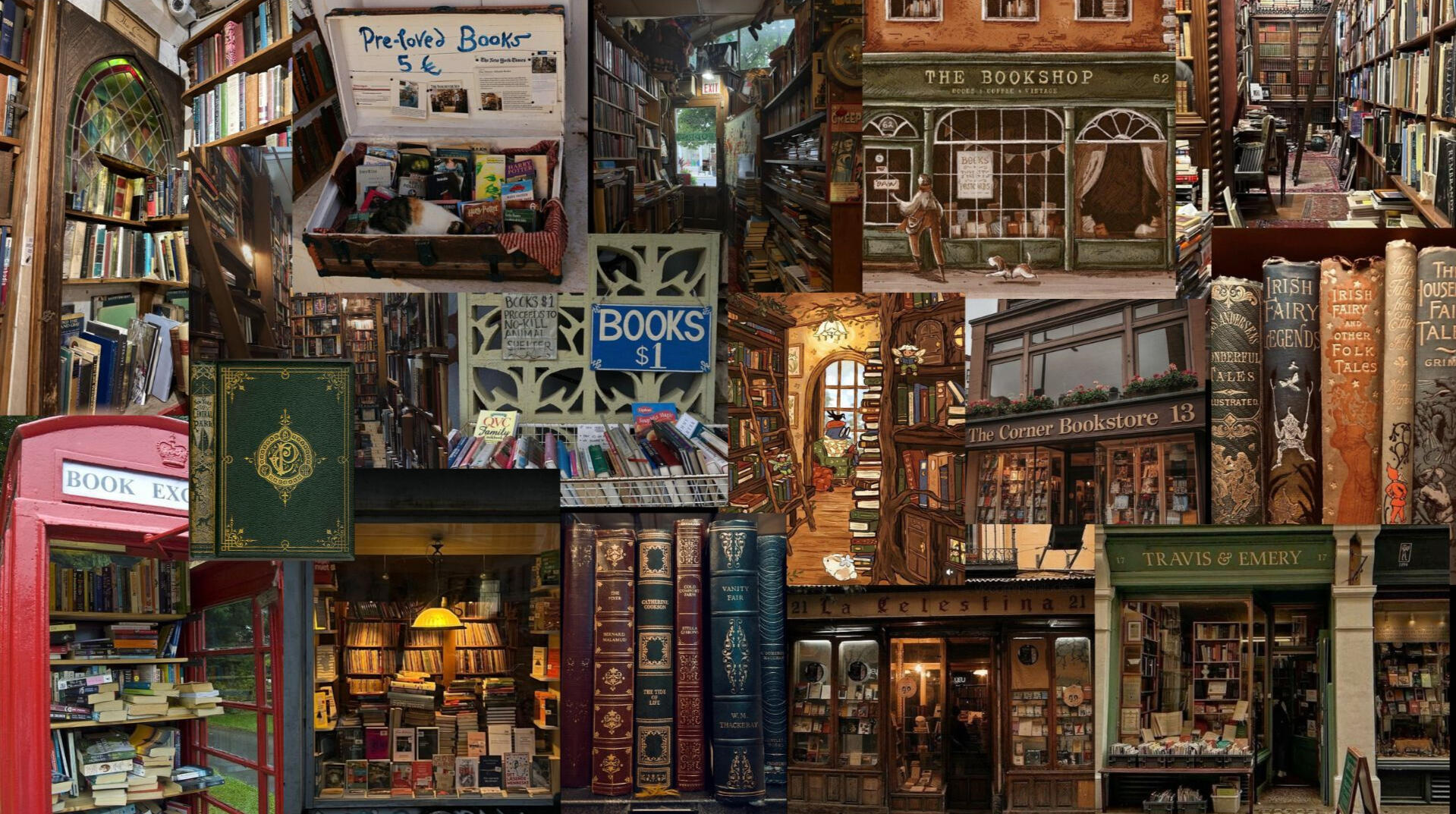
Little Library was born from Marceline's love of secondhand books, the dark academia aesthetic, and cozy shop simulators - taking inspiration from games like Unpacking and TCG Card Shop Simulator.
Moodboard
Initial Concept Notes & Sketches
Press images for enlarged view.


One of the first major choices in the process of designing the game was narrowing down the books to only classics. Games featuring books often have parody versions of modern popular books in order to avoid any licencing and copyrighting issues (as an example, 'Fourth Wing' might be titled 'Fifth Wing'). Avoiding this problem altogether, Little Library only feature classic literature titles that are in the public domain. While this was a convenient choice in terms of licencing, it has inadvertently had numerous other benefits that have only enhanced the game:
The dark academia aesthetic/subculture (which the game draws significant influence from) is largely shaped by classic literature - so much so that reading classics has become a major identifying characteristic of the culture. Highlighting classics heightens the game's association with the dark academia aesthetic and ensures the game maintains a consistent theme.
It caters to a niche market. Since there are countless books across countless genres, it can be difficult to narrow down an audience further than general 'readers'. Highlighting exclusively classics invites players who are interested specifically in classics and can encourage more of a cult following. As previously addressed, many games take a broader approach, featuring a wide range of popular books from several decades and genres. While this has a broader appeal, it can in some cases reduce engagement and enjoyment of its players. Example: In another game, a player might like x number of books and not care about or dislike the rest. Seeing as Little Library is targeted specifically towards classics readers (or at least readers interested in learning more about classics), players are more likely to be interested in a larger number of books in the game, since they all cater to that niche. While this may narrow the overall audience, players who are genuinely interested in the game are likely to have higher enjoyment and engagement.
It invites the player to learn about classics. Despite being targeted towards classics readers, Little Library is designed to be able to be played at any knowledge level. The database menu stores information on each of the books and is the main reference point for players as they find an appropriate recommendation for their customer. The range of preferences amongst the characters prompts the player to interact and read up on as many books as possible, and by identifying recommendations and narrowing down books to a character's preferred genre, they are passively learning about their library of books as they play.
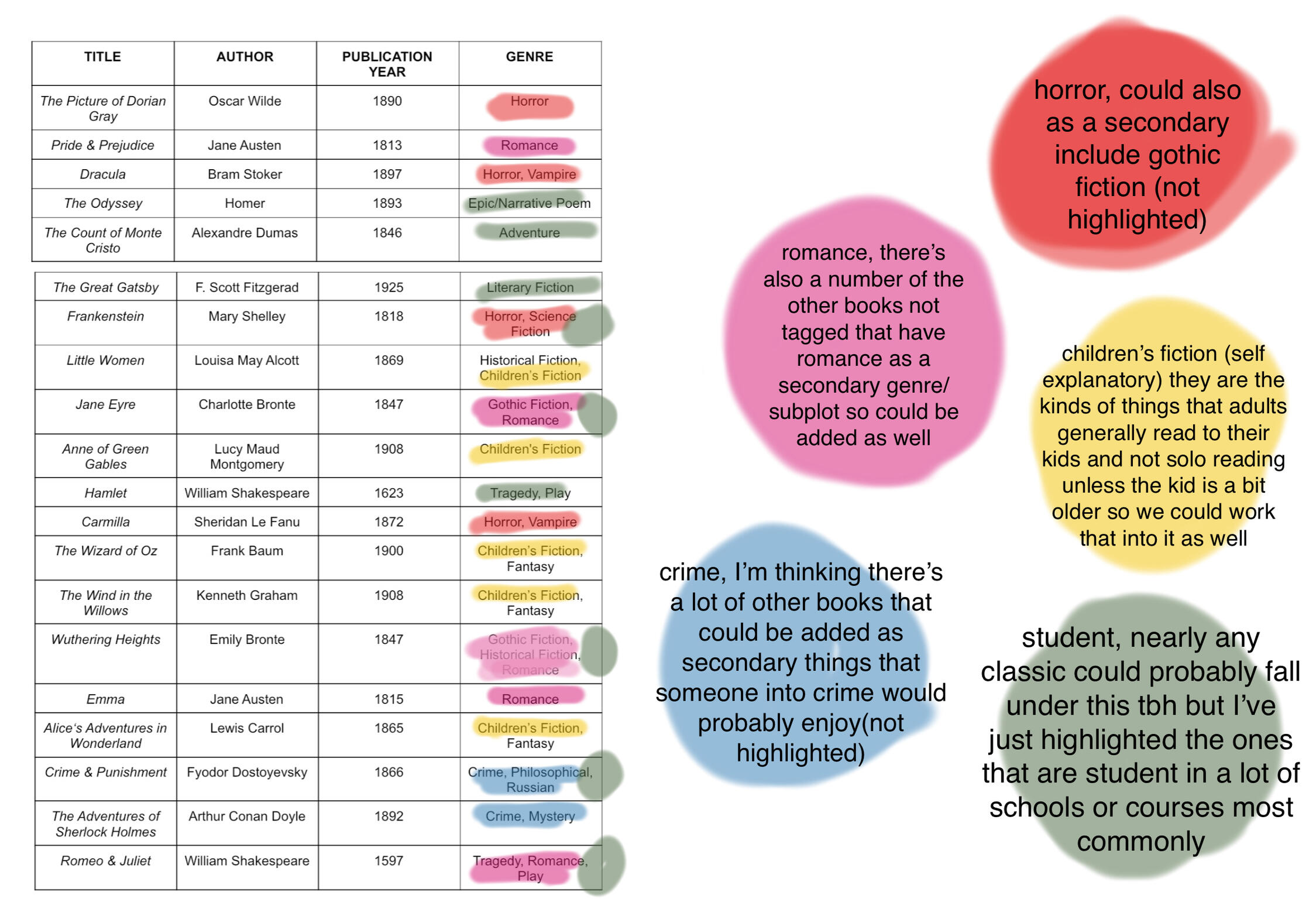
The books themselves, while all being under the overarching category of "classics", were selected across a range of genres in order to maintain a satisfying and enjoyable variety of options. While there is space for and plans to expand the assortment of featured books, the current selection is primarily "popular" and more recognisable titles. This will attract fans of said books to the game, as well as increasing a new player's comfortability in beginning the game. Even if they have not read the titles themselves, they will likely be familiar with several titles and their general genres, assisting in their recommendation choices and ensuring they feel less overwhelmed with the choices.
The below diagram showcases a visual breakdown of the selected books by genre, sorted amongst five categories, each representing a future character. Characters were designed around these categories to give a diverse spread of genres and interests that generates more interesting and enjoyable gameplay.
Another early decision was to make the bookstore stock specifically secondhand books. Sourcing books secondhand is a deeply important topic to Marceline, thus when given the platform as a director and designer to bring attention to (and hopefully inspire others to partake in) buying secondhand, it was a natural design choice.Similarly, the typical financial aspect of the shop simulator gameplay was ruled out. In games such as TCG Card Shop Simulator and Supermarket Simulator, players reference the purchasing cost and market price of items to choose the cost by which they resell them - directly influencing their profit as a store and in turn, their 'success' in said game. While this is a perfectly acceptable (and undoubtedly enjoyable) gameplay experience, when paired with the context of a secondhand store, it begins to raise questionable morals. This gameplay model encourages and rewards players for charging as much money as possible - far above a product's worth - a practice that is not uncommon within the real world secondhand market. The act of 'scalping' or turning buying secondhand into a 'captialism simulator' (despite how enjoyable capitalism simulators can be) is not the morals nor messaging Little Library wishes to convey. Thus, the financial element was scrapped altogether.Instead, money was replaced with customer satisfaction and achievements, creating alternative methods of 'reward'. After a customer is recommended a book, the store's customer satisfaction rating is adjusted based on how well the book suits their prompt and preferences. For example, if a recommendation is completely unfit for the customer, the rating will decrease, and in turn when a recommendation is well-suited to a customer, the rating will increase. Rating is measured out of a total of/maximum of 100. This provides an incentive to the player to give accurate recommendations, as well as providing a visual display of their sucess on their screen (similar to how a typical game would display financial balance as a measure of success).On the other hand, achievements not only further encourage and reward the player for their continued engagement, but they also serve as a replacement for the finances. In a typical shop simulator, stock can be purchased from the stores profits and finances. In Little Library, since there is no finances shown, the player will always recieve a bookbox at the start of each day. ^^ Achievements and type of book boxes have been temporarily removed from the current build due to time constraints, but will still be discussed as they will be re-added in later expansions.Through achievements, players can unlock different types of boxes which they can choose between ordering for each day. In future expansions, this will assist players in restocking a specific genre they may be short on in order to satisfy specific customers needs - or further down the line, help in collecting "full sets" of a genre, if such a system was implemented. The nature of achievements - rewarding players for recommending books from certain genres - further encourages players to engage with books from a wider range of genres, outside what they may naturally gravitate towards, and in turn rewards them for this engagement.
Achievements
| Achievement Name | How to Obtain | Reward/Unlockable Feature |
|---|---|---|
| The Romantic | Recommend a Romance Book | Romance Box |
| The Unafraid | Recommend a Horror Book | Horror Box |
| The Imaginator | Recommend a Children's Book | Children's Box |
| The Academic | Recommend 3 Books | Academics Box |
| The Big Reader | Recommend 5 Books | Large Box |
| The Collector | Receive One Copy of Every Book | - |
| The Socialite | Meet All Customers | Front Window Display * |
| The Curious | Read More About A Book in the Database | - |
* The front window display is also not in the current game build (yet). The proposed concept implements an accessible shelf in the front window of the shop that the player is able to arrange with books of their choice. Displaying certain sets or collections within a certain genre would increase the chance of specific customer with a liking to that genre to visit. As the player accumulates more books, the front window could also be used to display a personal collection or set that the player is proud of and wishes to hold onto and display.
Book Boxes
| Type of Box | How to Unlock | Possible Books | Quantity of Books |
|---|---|---|---|
| Small Box | N/A, Starter Box | All | 5 |
| Romance Box | Recommend a Romance Book Achievement | Pride & Prejudice Jane Eyre Emma Romeo & Juliet | 3 |
| Horror Box | Recommend a Horror Book Achievement | The Picture Of Dorian Gray Dracula Frankenstein Carmilla | 3 |
| Children's Box | Recommend a Children's Book Achievement | Little Women Anne of Green Gables The Wizard of Oz The Wind in the Willows Alice’s Adventures in Wonderland | 3 |
| Academics Box | Recommend 3 Books Achievement | The Odyssey The Count of Monte Cristo The Great Gatsby Frankenstein Jane Eyre Hamlet Wuthering Heights Crime & Punishment Romeo & Juliet | 3 |
| Large Box | Recommend 5 Books Achievement | All | 7 |
Concept Art
Press images for enlarged view.
Art by Kelly Tran.


UI & Gameplay Mockups
Press images for enlarged view. Mockups created in Adobe Illustrator.
Background concept sketches by Kelly Tran.


Book Covers
While having a unique cover for each book is enjoyable as a concept, it would have significantly expanded the scope of the game. A set of "generic" base covers that can be used on any book ensure the game is scalable - adding new books is as simple as inputting the book's details, not restricted by a need for hours of artwork to be created for each individual book.Additionally, thrifted books (particularly classics) come in a wide, random variety of covers which, due to the nature of buying secondhand, often cannot be chosen. Implementing random covers plays a crucial role in 'world-building' a secondhand bookshop, as well as the player's immersion.Seeing as the current game has limited book options, this also helps to create more variety and interest in gameplay. While a system is in place to prevent duplicate books within the one bookbox, it is inevitable to own more than one copy of the same book within a few days of gameplay. Having a variety of cover designs adds a positive perk to owning duplicates of a book, which may have otherwise been perceived negatively.Future expansions could build upon this, such as customer preferences for specific covers, or achievement bonus' based on collecting sets of a book in different covers.
Press images for enlarged view.
Covers designed by Kaitlyn Tullberg


Books
The data for each book is stored as a Scriptable Object (referred to as 'BookData'), which the details for can be set for each title in the Unity inspector.
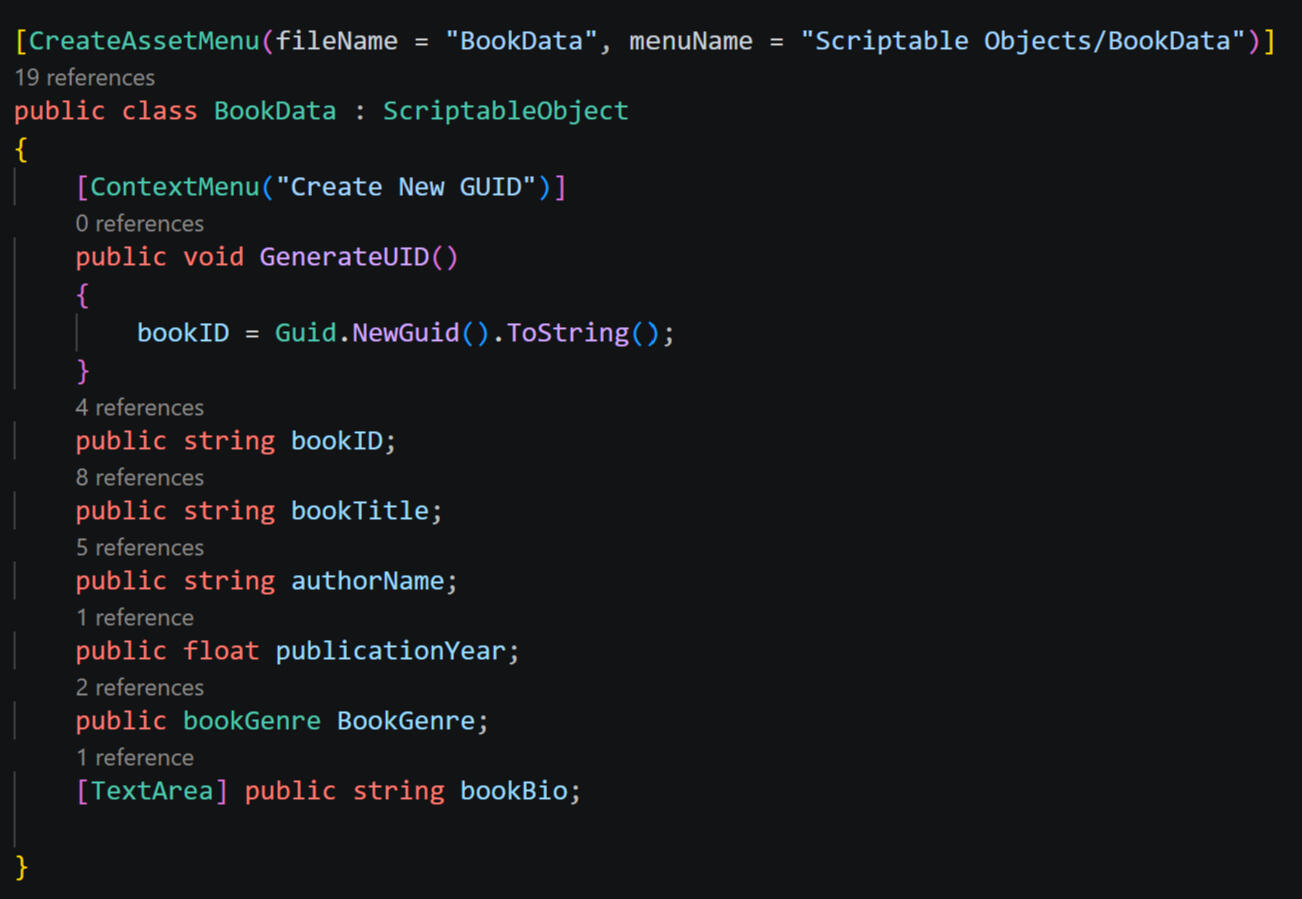
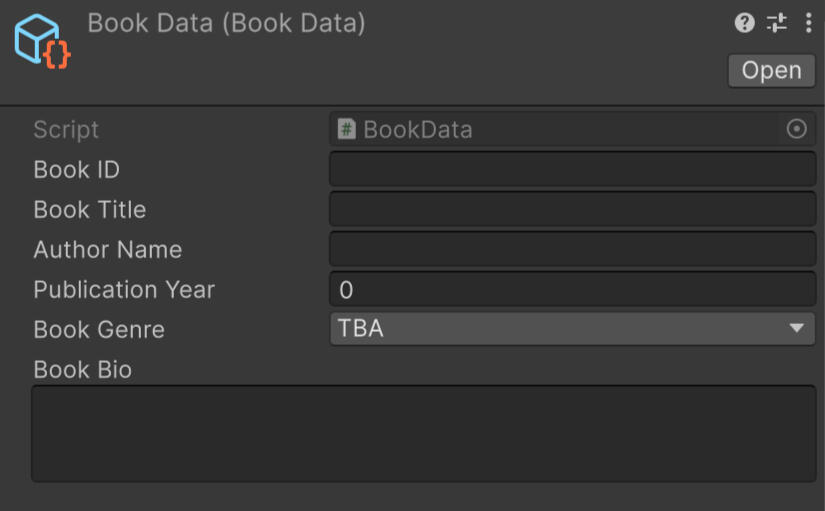
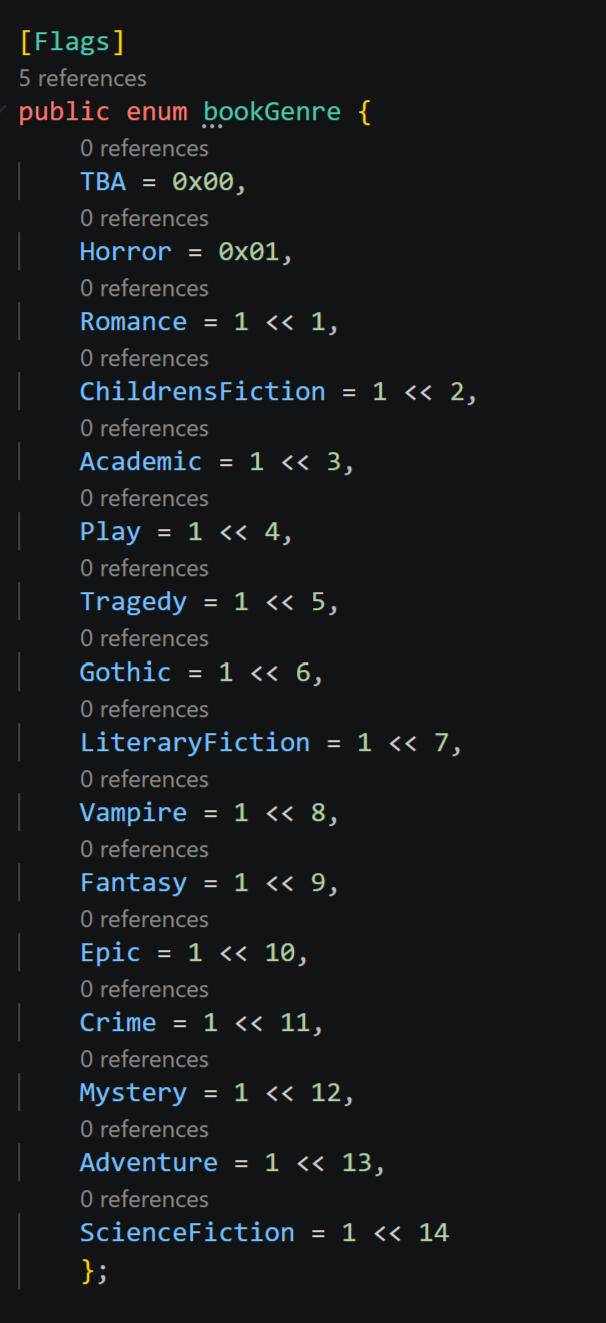
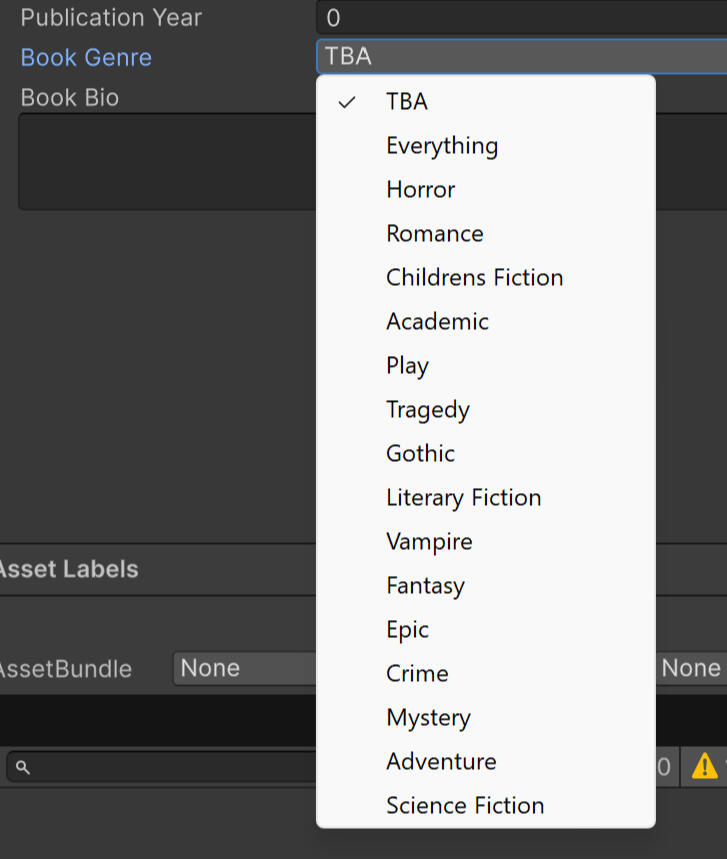
Genres are stored as flagged enums, which ensures that more than one genre can be selected for each book.
Each book is instantiated from a prefab GameObject with blank values. On instantiation, books will recieve a random BookData Scriptable Object and cover sprite from a list of all possible options. The prefab will then assign the necessarily variables from the bookdata (title, author, etc) and render them onto the GameObject so the cover, title, and author are displayed.
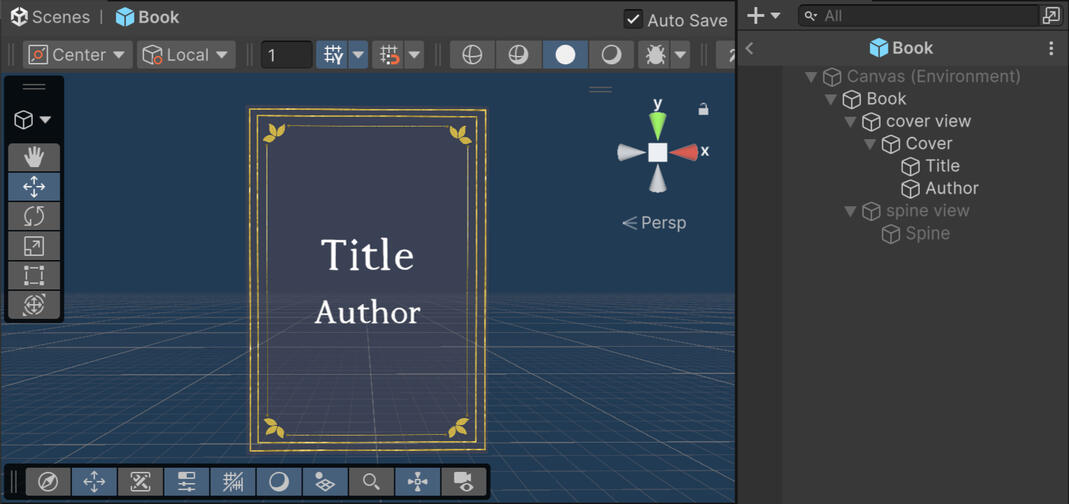
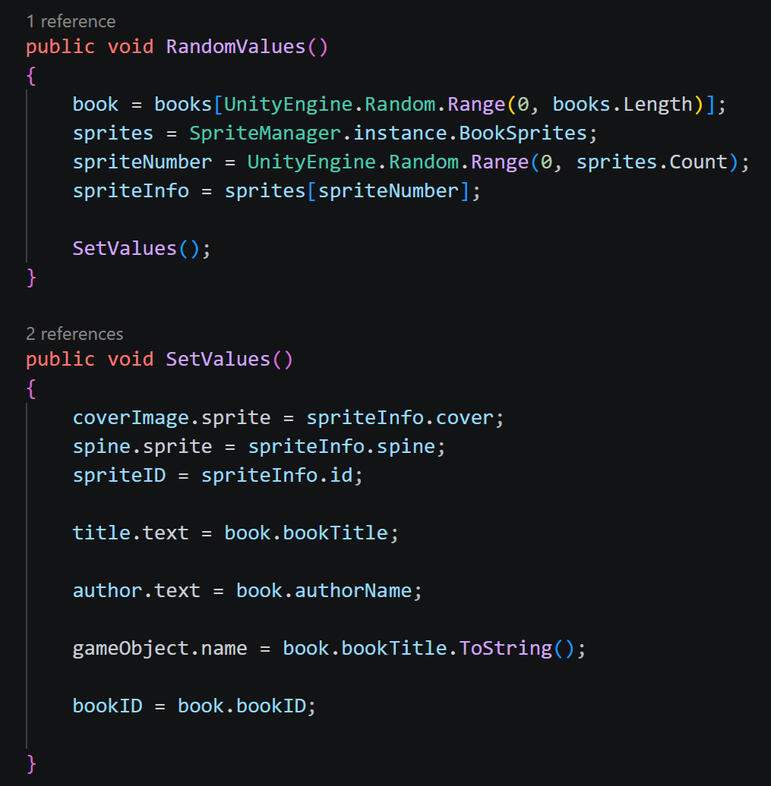
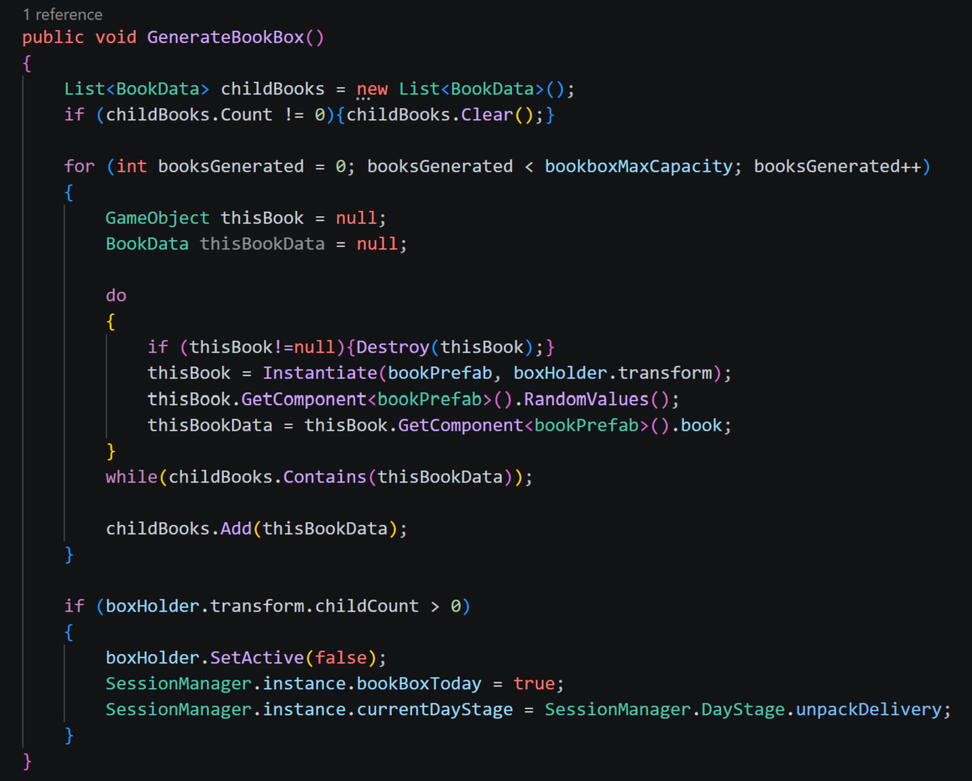
At the start of each day, 5 books are generated as children of the bookbox GameObject. During this process, the bookbox script checks if each generated book has the same BookData (aka is the same book) as any other books within the current box, and if it is a duplicate, the generation process will loop until the box contains 5 unique titles.
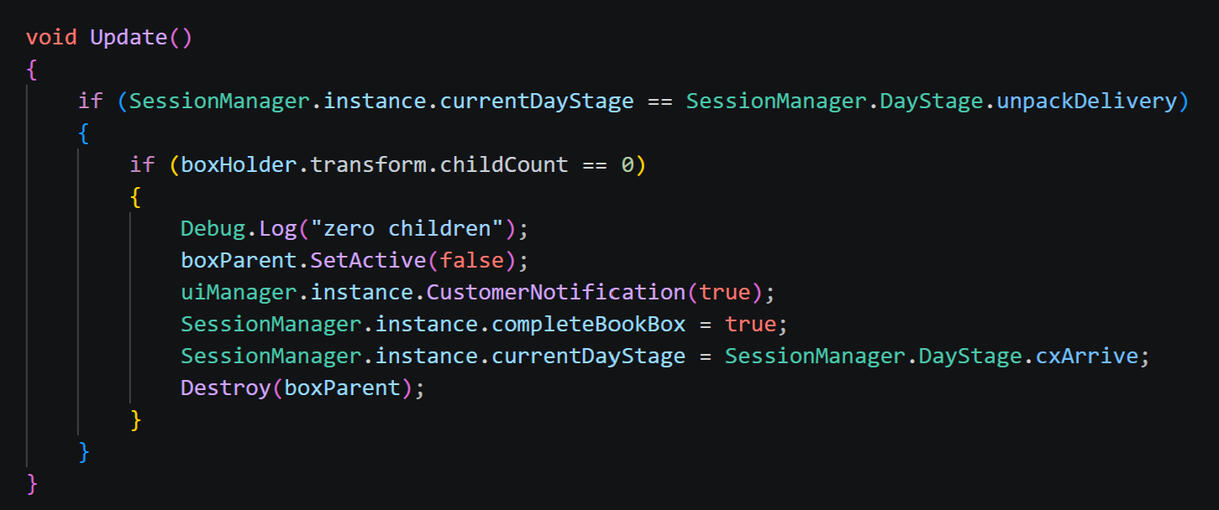
When the box has zero child GameObjects remaining (all books have been removed and sorted onto shelves) this triggers the first customer of the day entering the store.
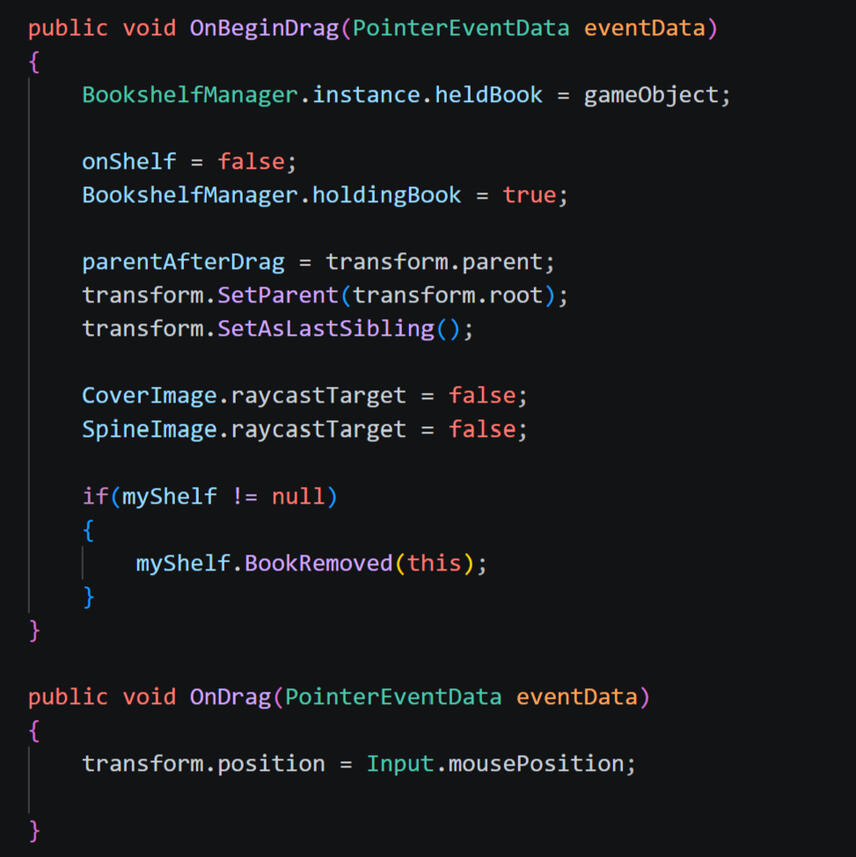
To move books onto and between shelves, the game registers mouse presses on book GameObjects and will track the book's position to the mouse position as long as the mouse is held down on said book. In order for the book to stay visible on top of all other books as it is dragged across the scene, its parent is set to the last sibling in the heirarchy.
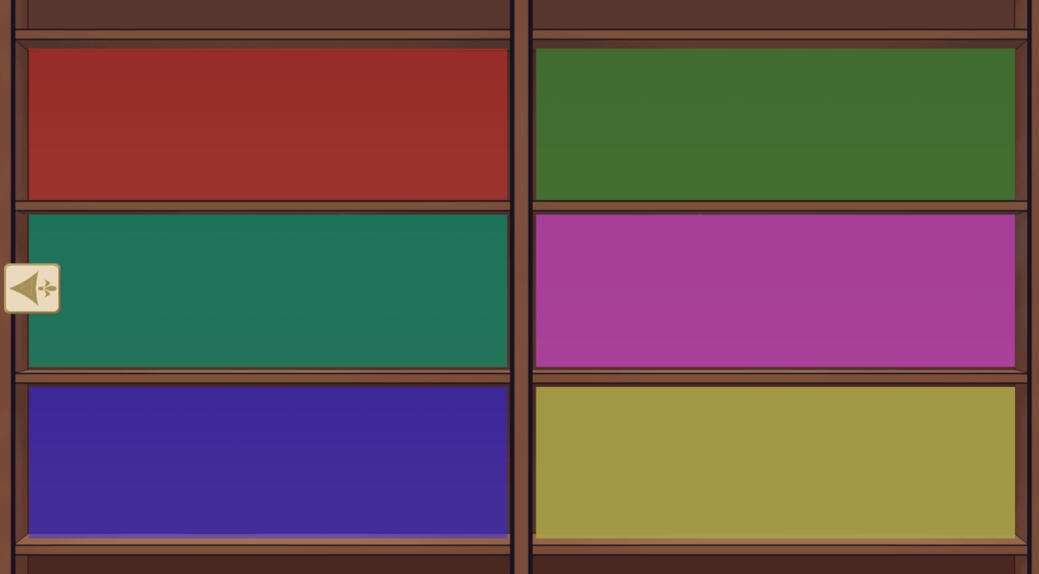
To put books onto shelves, each shelf area is seperated into its own GameObject with a horizonal sorting group (enusring that when dropped the books will "snap" into place and remain evenly spaced)
Colour visual of each seperated shelf section
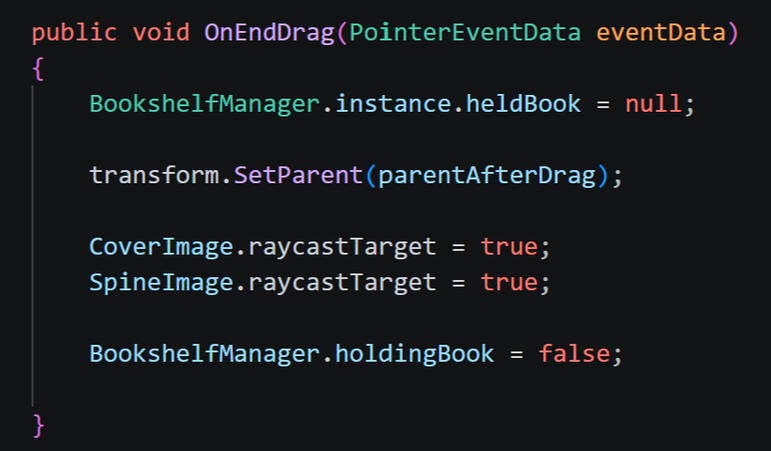
When the book is picked up, it saves it's original parent, so by default, when the mouse releases the book, it will reparent itself back to said original parent. If the book is released over a shelf (raycast targetting is disabled on the book upon drag to ensure the mouse is able to register correctly which shelf it is hovering over without interference), it will then set the shelf as its new parent. Due to the sorting group, the book "snaps" into position on said shelf.
On Book
On Shelf
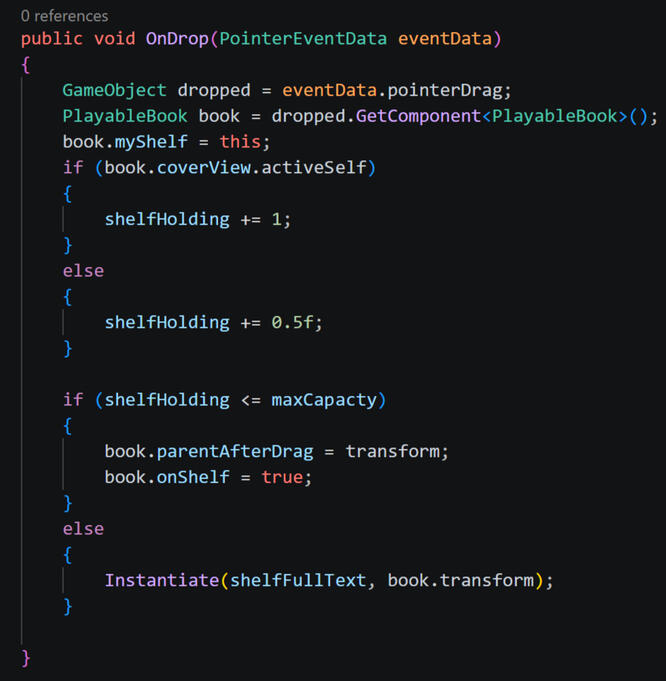
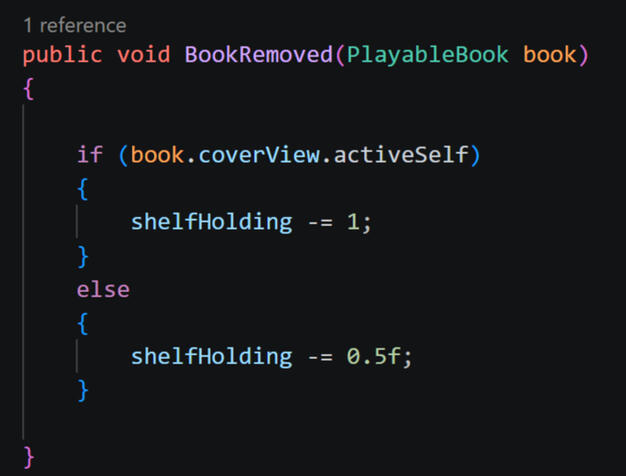
In order to ensure the shelves do not "overflow", each shelf has a maxmimum holding value equal to the maximum number of book sprites that can fit side by side on said shelf. Each time a book is added to a shelf, it adds +1 or +0.5 shelf holding depending if the book is on the spine or cover view (seeing as the spine view takes up less space). Subsequently, when a book is removed from a shelf this value will be taken away from its holding value.If the player tries to add a book to a shelf that is already at its maximum holding value, the book will be automatically reparented back to its original parent (the shelf it was previously removed from) and text will popup to indicate that said shelf is full.
While a book is being held (pointer down), the player can press R (rotate) to toggle the book from cover to spine view, and vice versa. The different views are seperated into child GameObjects which can be activated and deactivated based on this input. The RectTransform of the parent is adjusted to ensure that when the book is put onto a shelf it can maintain the appropriate distanced based on its current size (without, it will maintain extra distance when spine view is active due to the extra width on the cover view).
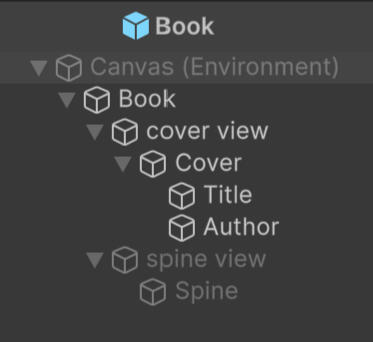
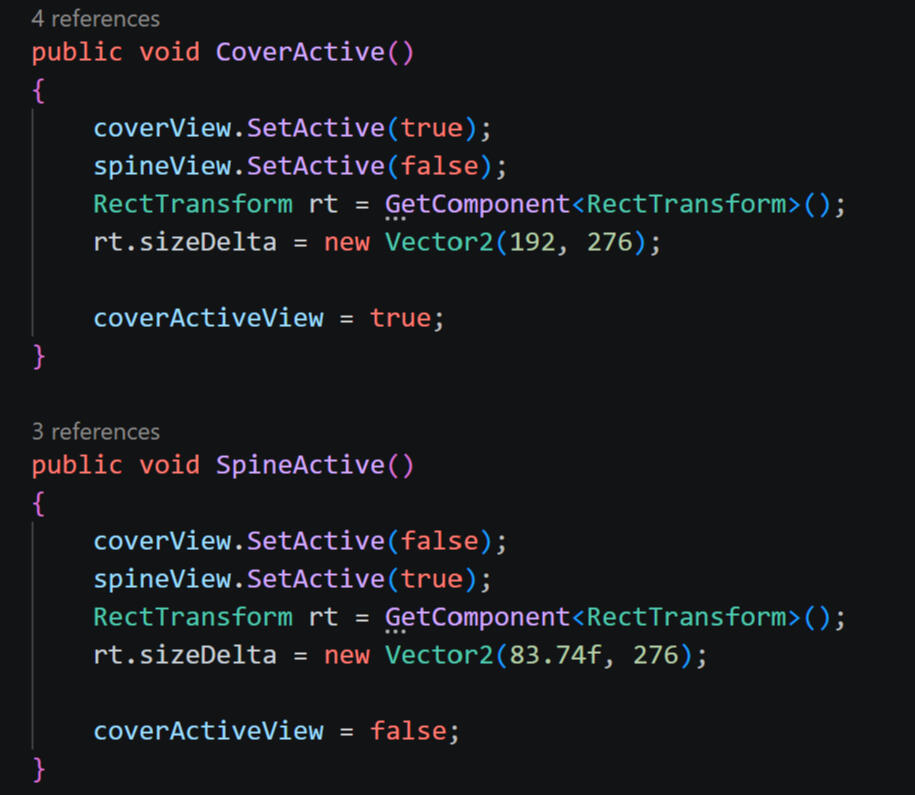
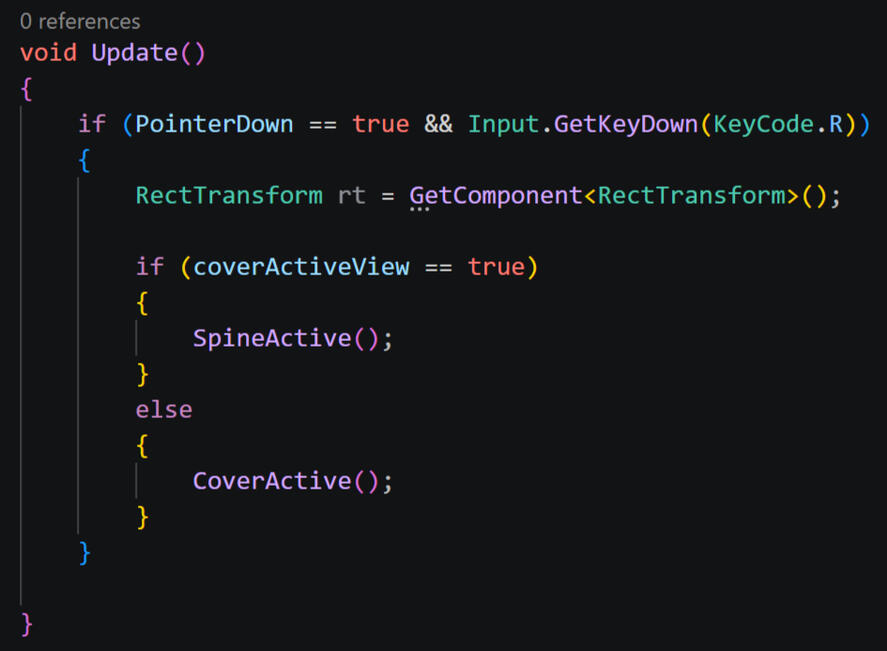
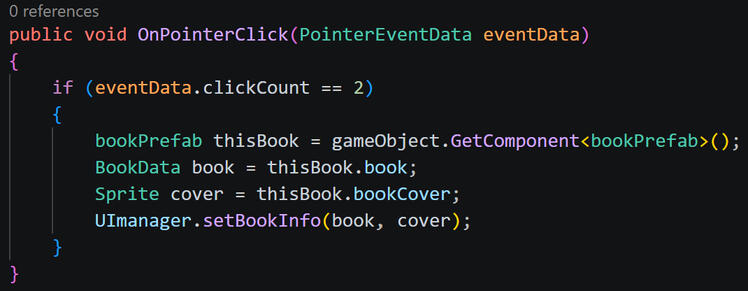
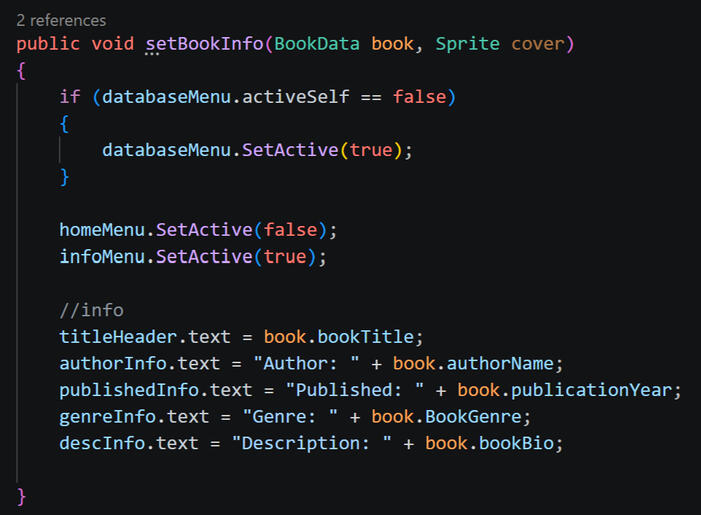
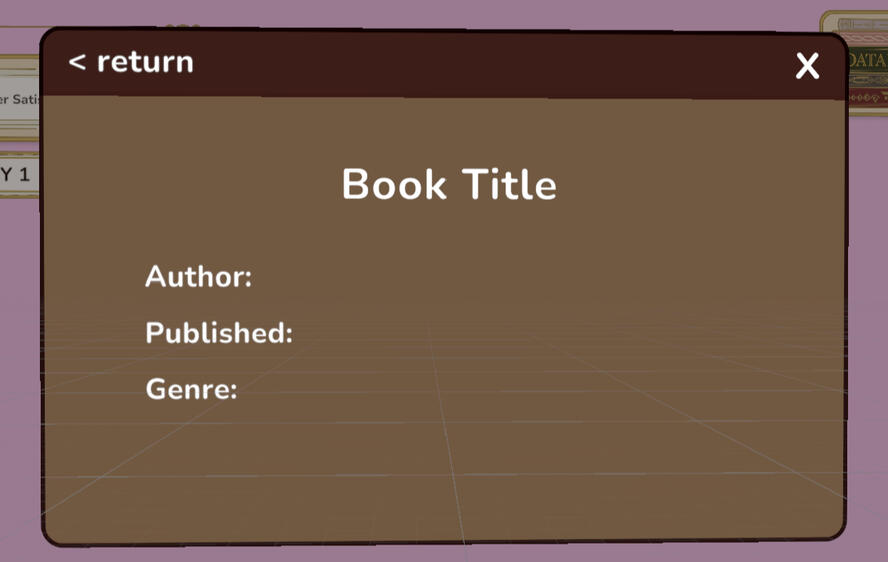
If a book is double clicked (counts two subsequent click interactions), it will activate the database menu and display the book info page, setting the book's details as text in the blank text fields.
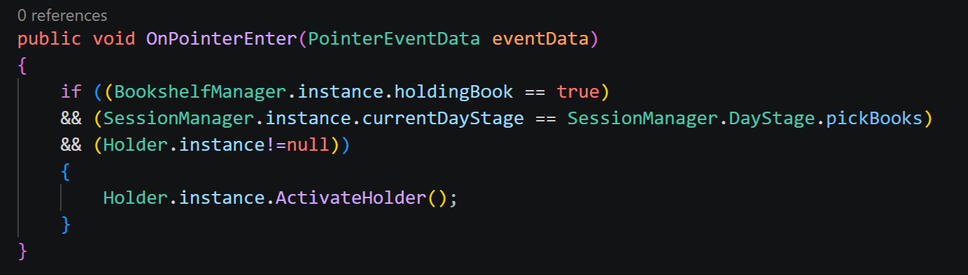
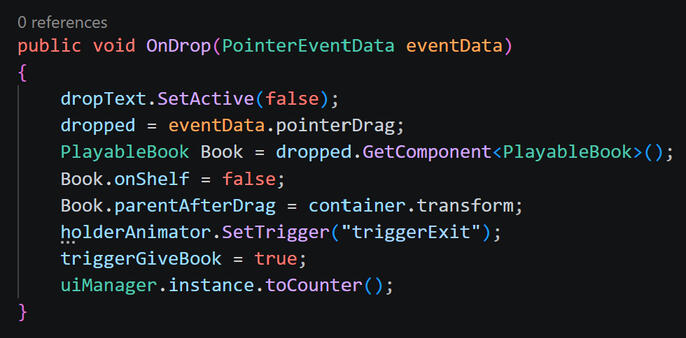
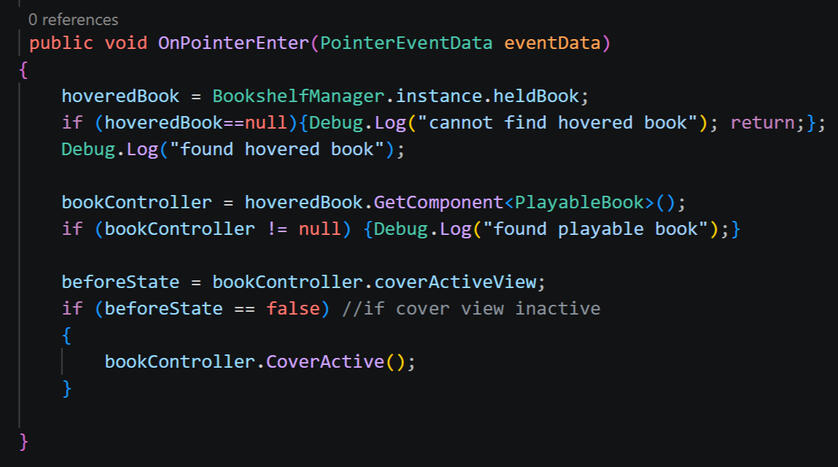
When it comes time to recommend a book, if the player picks up a book and hovers it over the left arrow button (which is otherwise used to change back to the counter scene), it will activate a popup box to drop the recommended book inside. This is linked to the "stage" of gameplay the day is in, which is set on the Session Manager, thus will not trigger if the game is not actively serving a customer.When a book is dropped into the holder (which also contains a sorting group to neatly snap the book into place), this triggers the "Give Book" dialogue interaction, with the said book passed through the save data into the counter scene (further addressed in save data section).
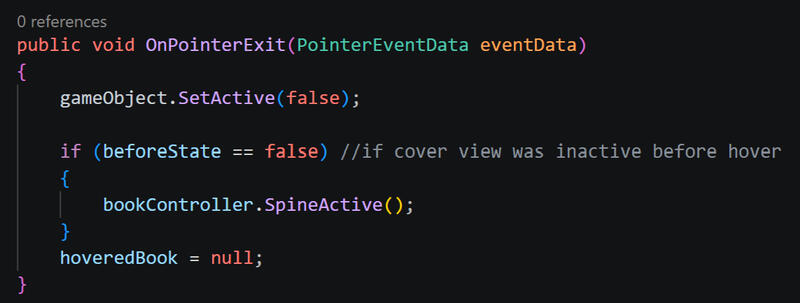
The popup also detects whether the book being hovered is set to the spine or cover view. If it is on the spine view, it will activate the cover view while the pointer is over the popup. This ensures that the title is cleary visible, and that the book is sized correctly when it is dropped into the "slot".When the mouse moves off the popup, it will deactivate, and the book will return to its previous state (if it was changed).
Customers
Using the same method as the books, each character's details are stored within a Scriptable Object. A customer GameObject with empty variables is always present within the counter scene, and the details for the active character are filled in as needed.While most details are regular string or int variables, the customer's favourite genre is selected in a pop down menu - the same system as selecting genres on the books themselves.
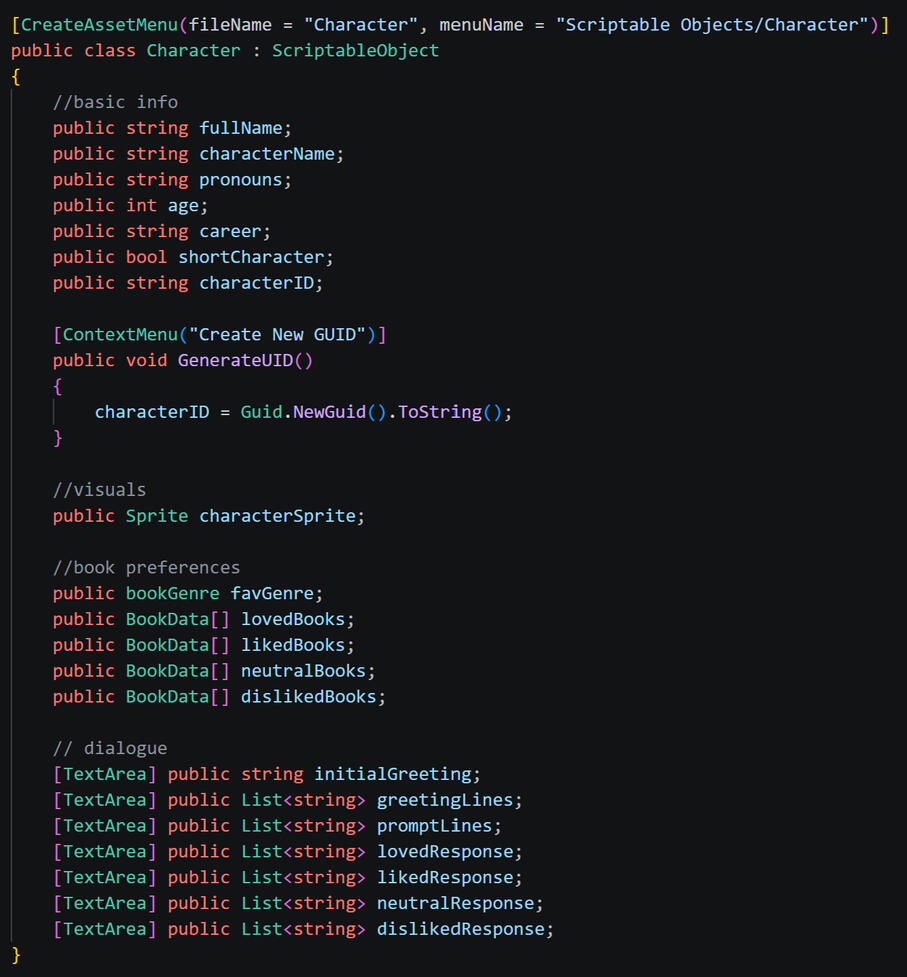
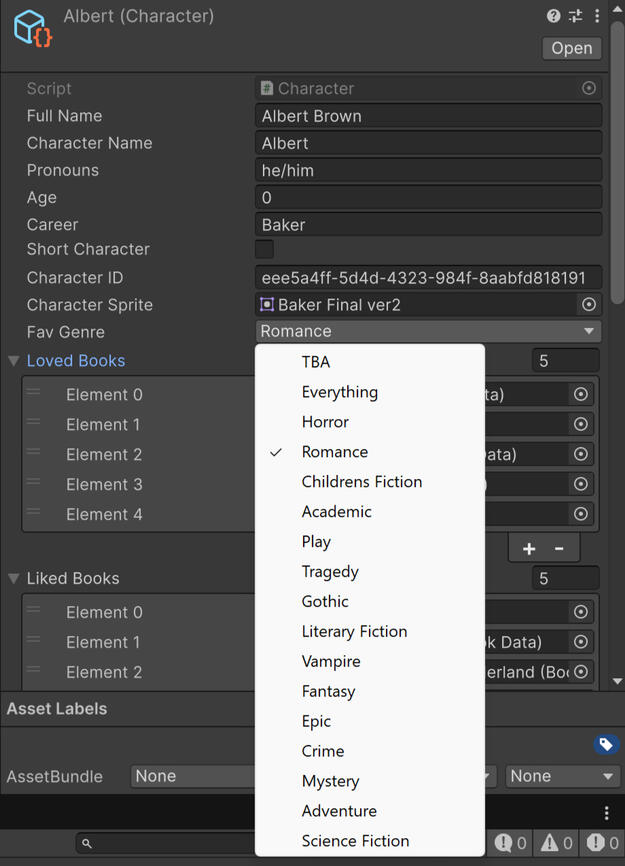
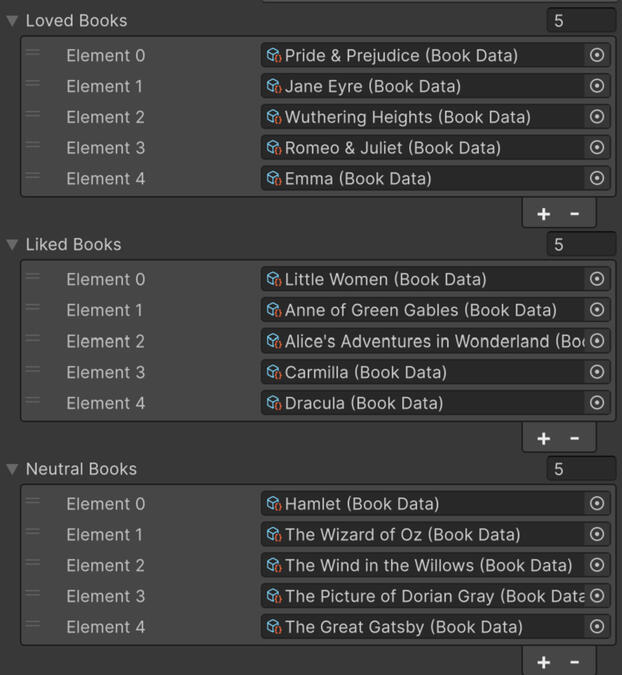
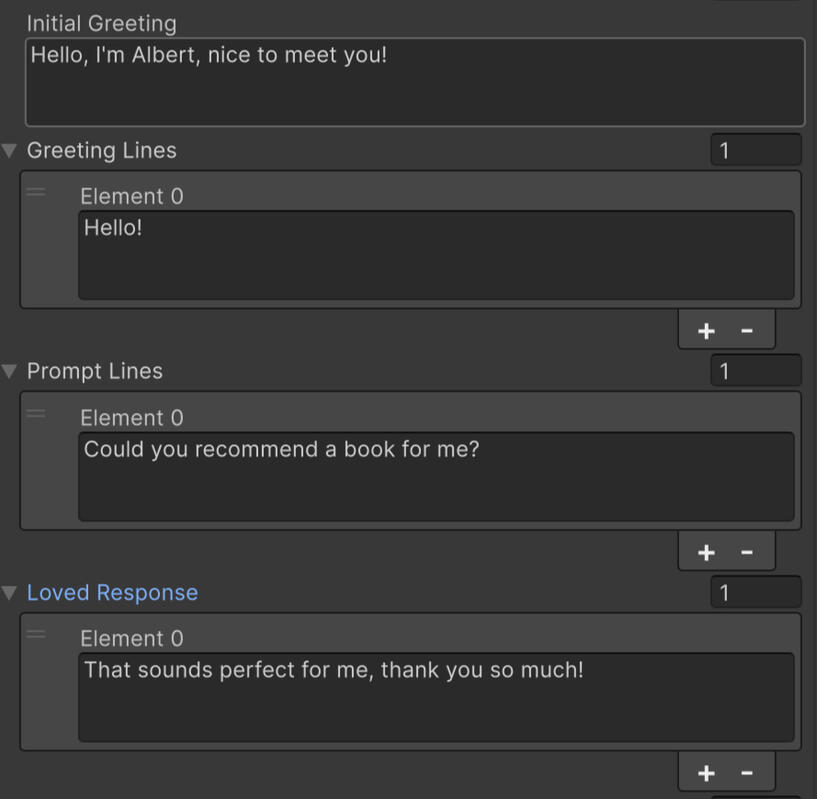
Book preferences are stored in arrays, with the corresponding BookData Scriptable Objects filled in under them.Similiarly, dialogue lines are stored in lists, with catagories corresponding with each stage of dialogue. Lines can be typed directly into the inspector window. In the current build, there is one line for each section, however the system is already place for easy expansion.
When a customer enters this store, a random character Scriptable Object is selected from a list of all potential customer. The randomised character is then compared to a seperate list that holds each character that has visited on that day; if the list contains the randomised customer (aka the customer has already visited that day) the random generation process will be looped until the output is a character that has not yet visited on said day.The character Scriptable Object is then assigned to the customer GameObject in the scene, and the character sprites set accordingly. To ensure that the shorter characters stay visible above the counter, the position (y axis) is changed in relation to the characters height.
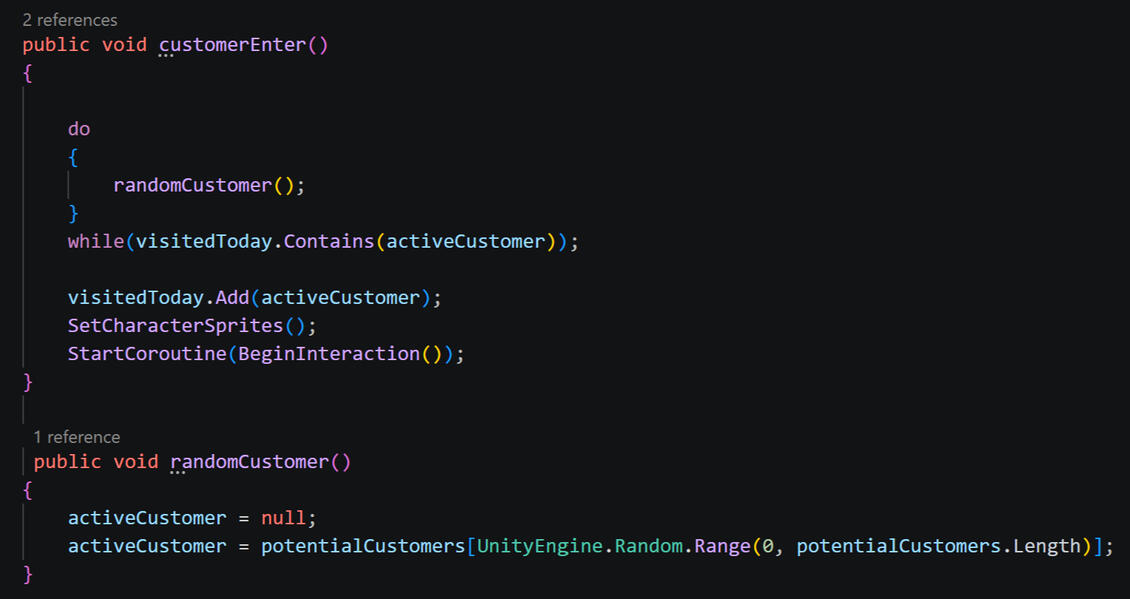
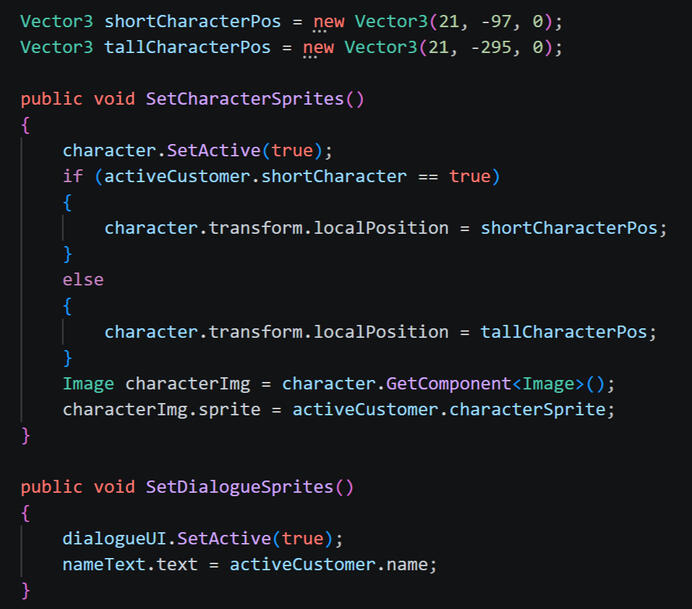
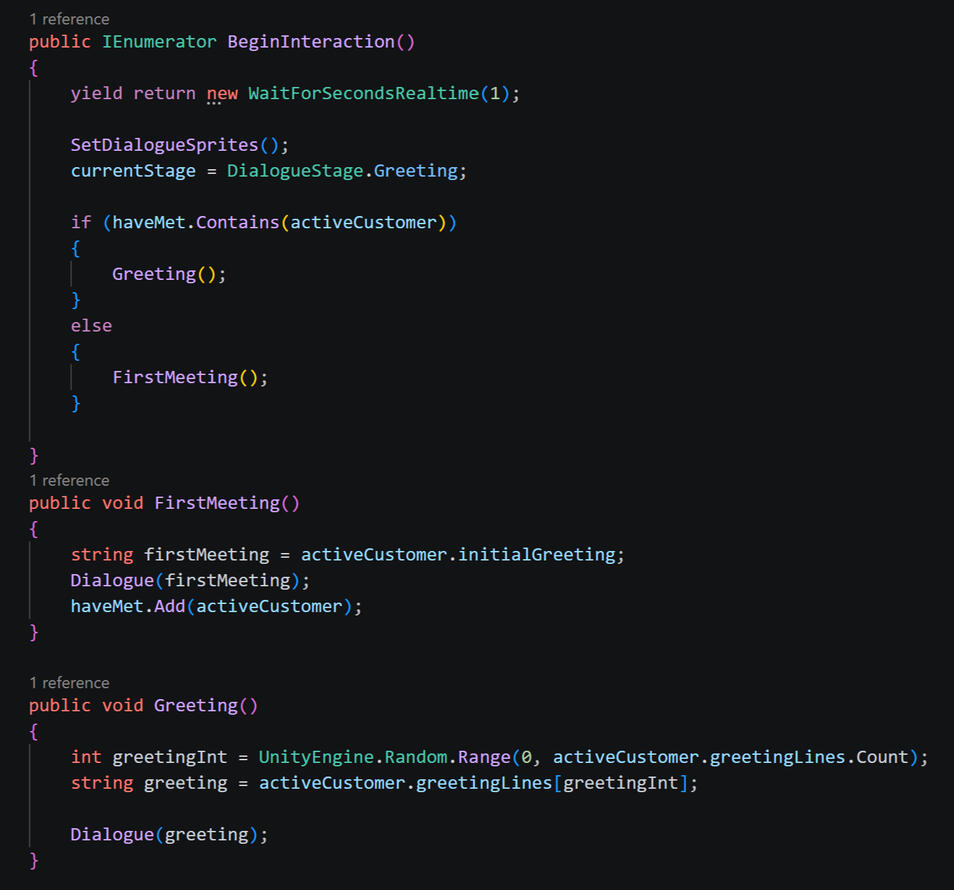
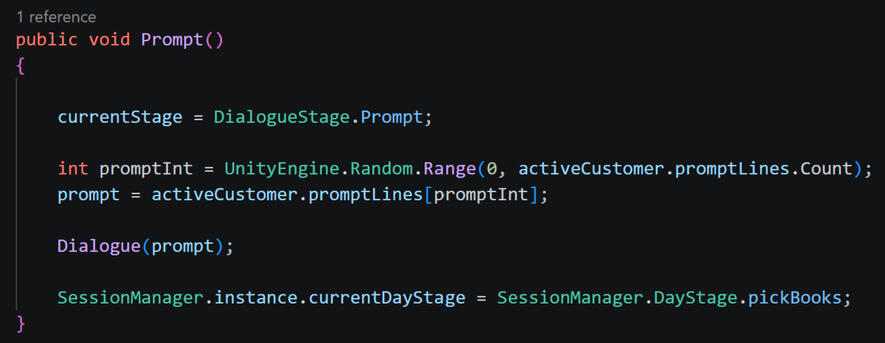
Once the customer is set in the scene, the first interaction is triggered. The Counter Manager stores a list of every character who has been met in the game (seperate to the list for each day); if the active customer is in said list, it means they have visited before, and will continue onto the regular greeting dialogue. If they are not in the list, and thus have not been met before, the first meeting dialogue - which will introduce the character and their interests - will be triggered.Each stage of dialogue is seperated into its own class, where it accesses the active character's Scriptable Object list of dialogue lines for the specific interaction and selects one at random.
The randomised dialogue line is then fed into the Dialogue and subsequent TypeLine classes, which animates the text one character at a time to create a typewriter effect. Interactions are also set to inactive while this effect is active, so dialogue cannot progress and any UI buttons cannot be interacted with until the line has been completed.
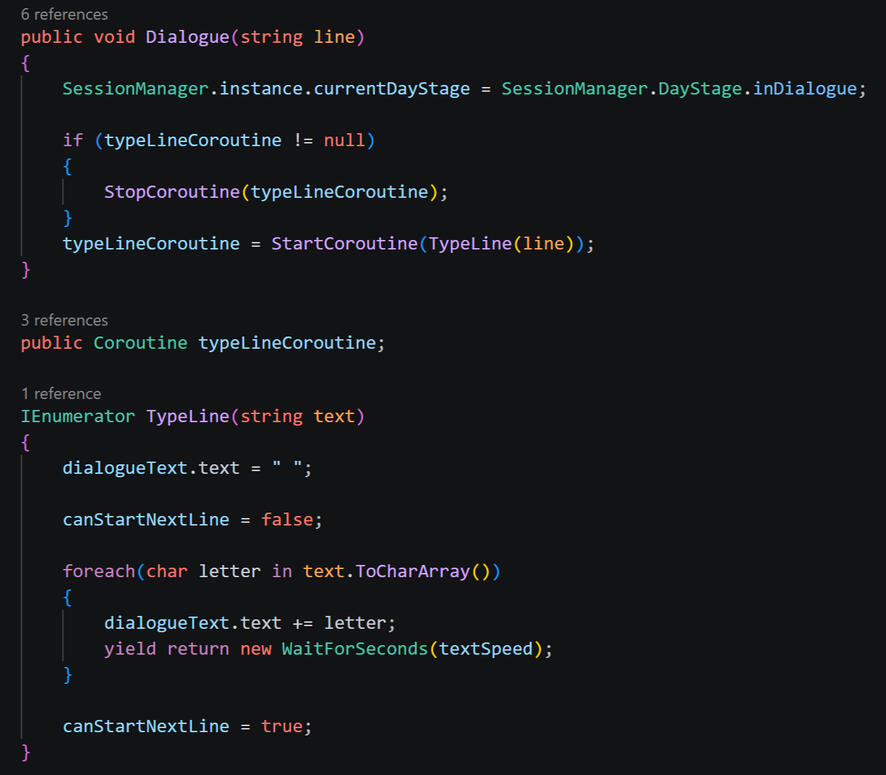
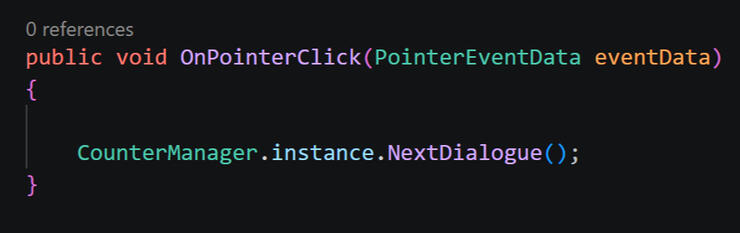
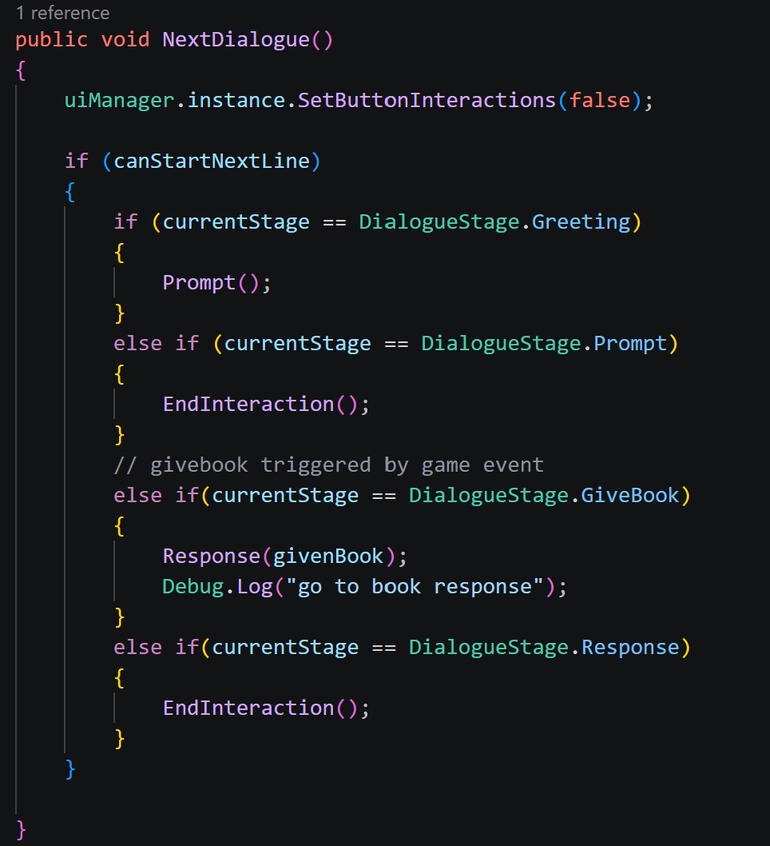
When the dialogue box is interacted with (and dialogue is not actively typing), it will progress to the next stage. Since the dialogue follows a simple step-by-step loop, the manager holds a variable of the current dialogue stage, and will then trigger the next dialogue stage accordingly for what should follow the current stage.
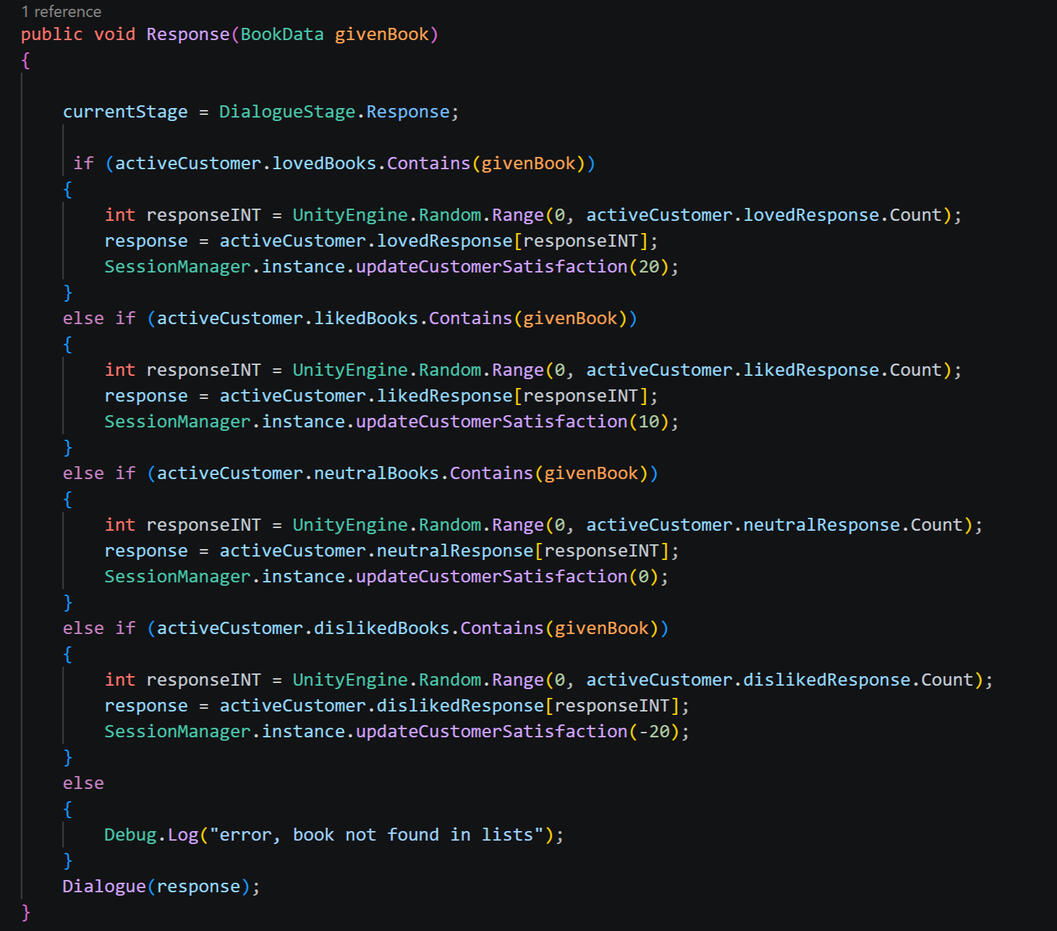
When the "give book" interaction is triggered (when the player presents their recommendation to the customer), the book's BookData variable is fed into the Response class through the save data (addressed in save section). The BookData will then be checked against the active customer's preference arrays, and once it has been identified in a list, it will trigger the appropriate dialogue line and adjust the customer satisfaction rating accordingly.For example, if a book is recommended that the customer dislikes, the script will identify that the customer's disliked list contains that book, and will trigger a random disliked dialogue line, as well as subtracting 20 from their customer satisfaction rating.
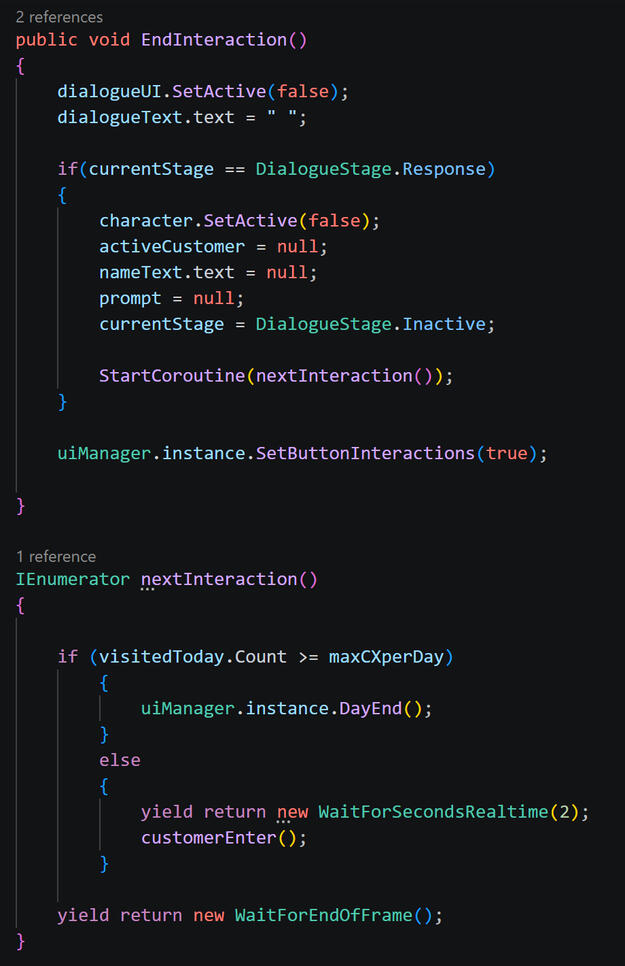
When the interaction has ended, the dialogue box and text are cleared and set as inactive, and UI interactions are re-enabled. If the most recent dialogue was the response to a given book, this sets the customer GameObject as inactive (as the customer leaves the store) and then clears all said customer's variables to prepare for the next customer to enter.Before progressing to the next customer, the game will check how many customers have visited today by comparing the length of the "visited today" list to the "max customers per day" int. If they are equal (indicating that the max customers has been reached), this triggers the end of day events. If this value has not been reached, the cycle will repeat with a new customer after a few seconds delay.
Save System
Save data is split into three catagories: counter data, bookshelves data, and game data.Counter and bookshelf data files are written (saved) and loaded each time their respective scenes are loaded and unloaded. Since each "area" is in a seperate scene, every time the player switches between the counter and shelves within the bookshop, all the active information (such as what books they own and what customer they are talking to) must be saved and reloaded.On the other hand, "game data" is only written when the entire game is saved at the end of each day, syncing both the current counter and bookshelf data together, as well as any extra necessary data (such as music volume, customer satisfaction rating, etc). This is the file that is loaded from the home menu when the game is started.
Variables that are saved within each save data class:
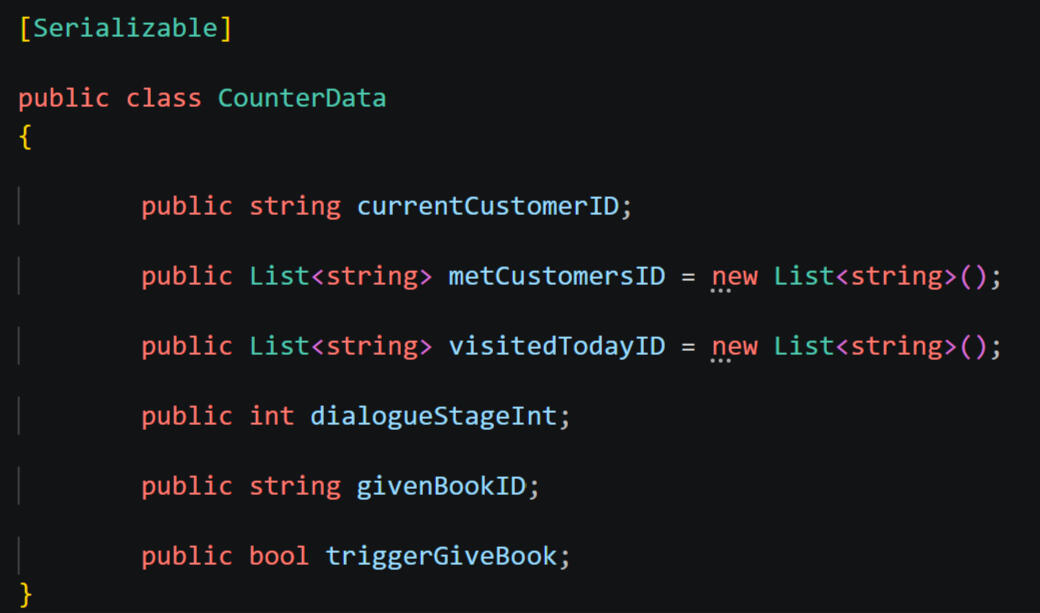
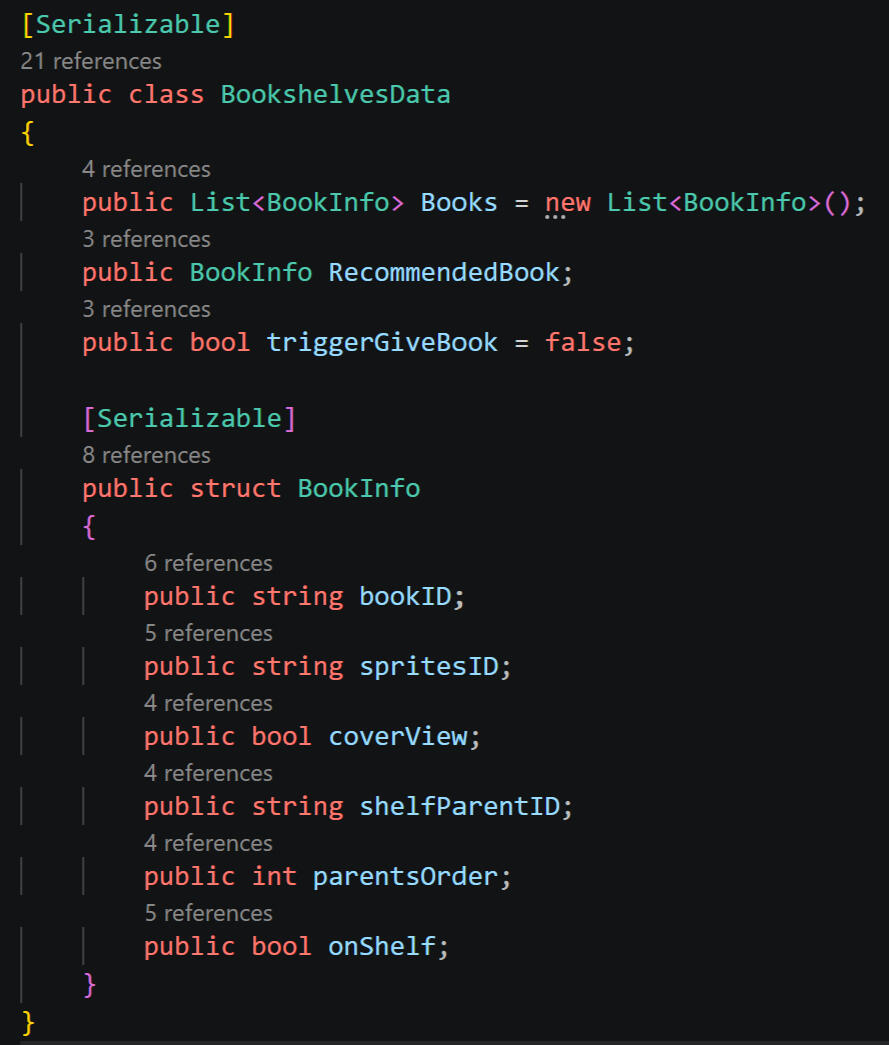
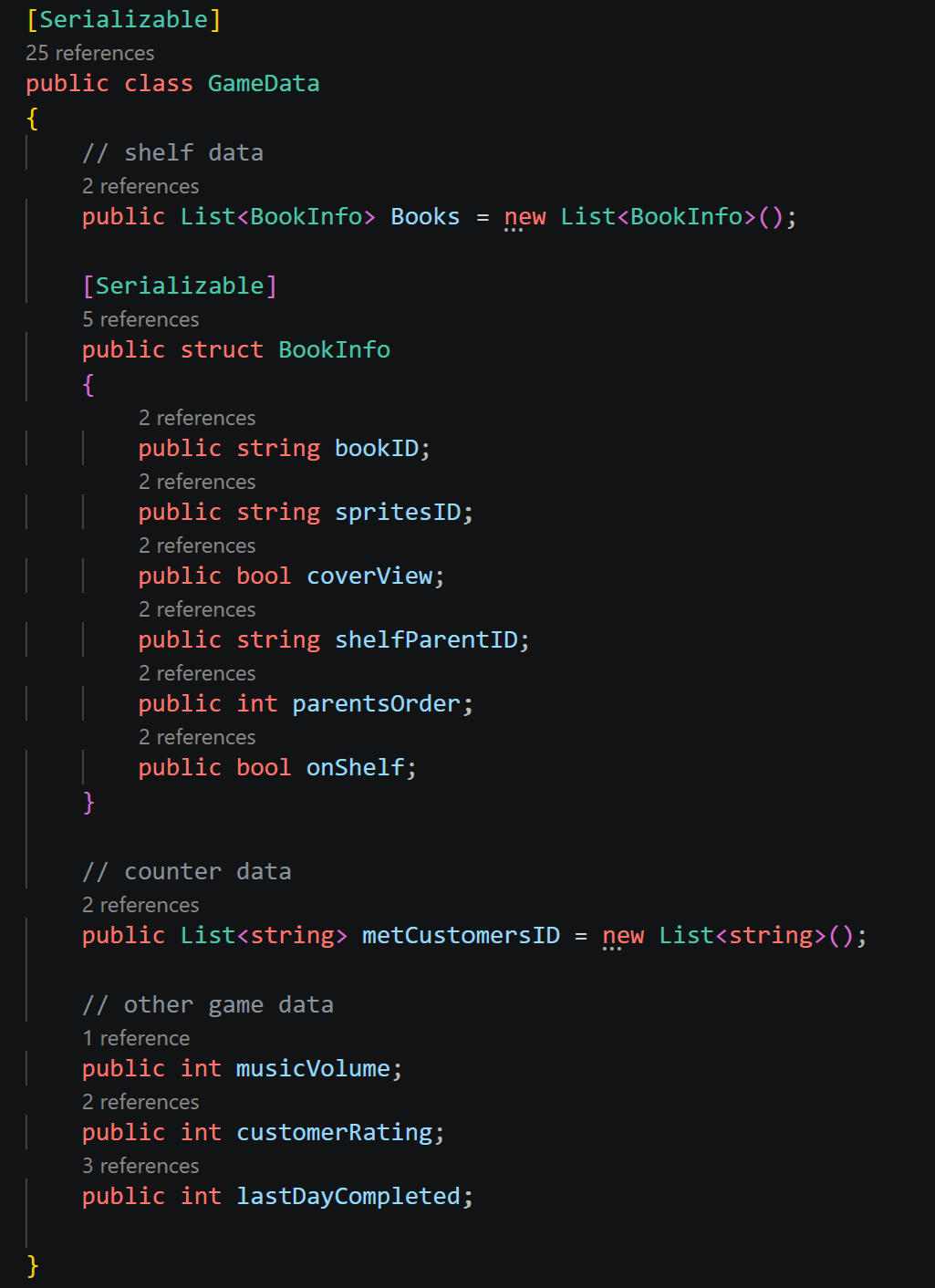
The game utilises a JSON file saving system, which initially created a major hurdle, as Unity GameObjects and other similar file types are not compatible with JSON. This meant exploring alternative methods of grouping and store the necessary data.For example, when imagining saving in an ideal state, one might imagine saving each book in the game as its entire GameObject state (which internally stores its assigned values of bookdata, cover sprites, etc). This is not possible with JSON.Thus, GUID IDs and manager systems were introduced. Everything that requires saving - that is not already in the form of a string or int (for example, customer satisfaction rating, which is already in number form) - is assigned a unique ID (generally a GUID to avoid any accidental overlaps or conflicts). When the game is saved, the ID of that piece of data is stored rather than the object itself. When the game is reloaded, the respective manager is used to identify and locate the information accociated with that ID, and rebuilds the sign/reassigns values based on the found data.
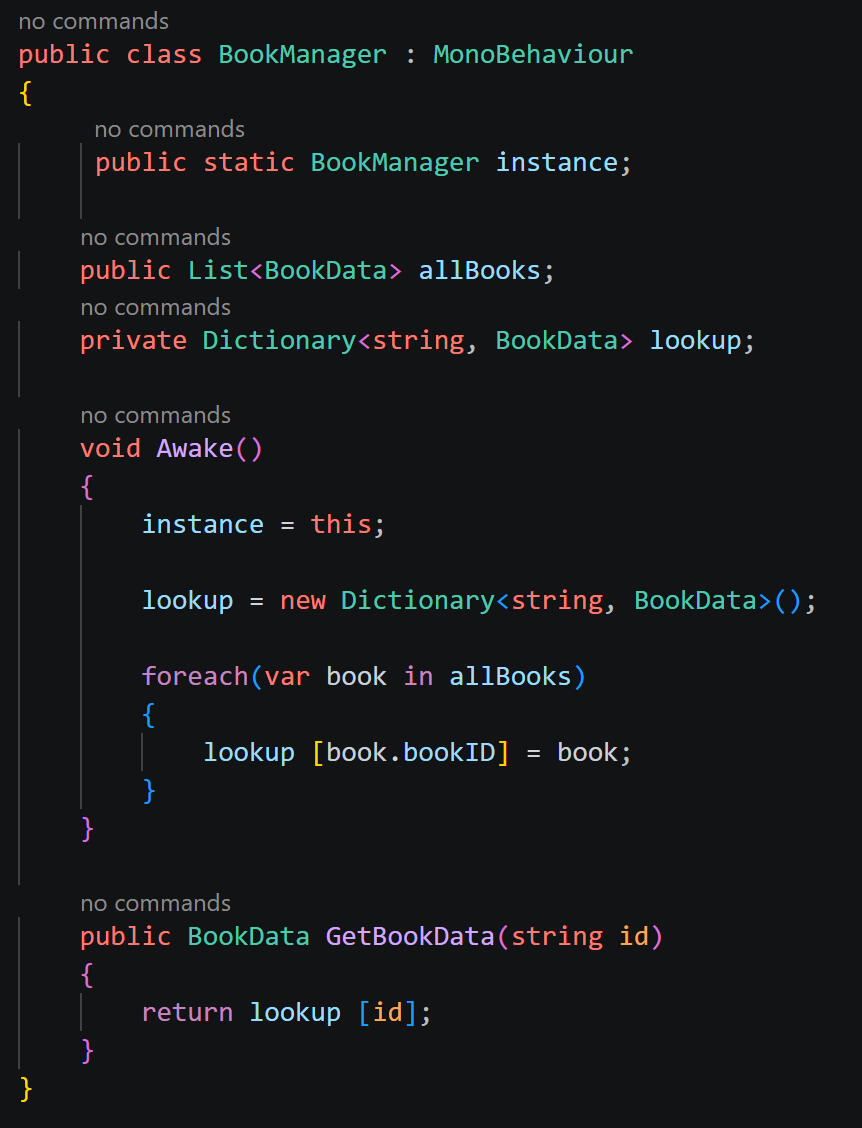
Example Manager: Book Manager
Stores a list of its necessary data in this case, all bookdata scriptable objects alongside each item's unqiue ID
When prompted, cycles through each item in said list and finds which item's ID matches the given ID
Returns the data that matches the given ID
Managers used for characters, sprites, shelves & books (bookdata)
Sprite Manager
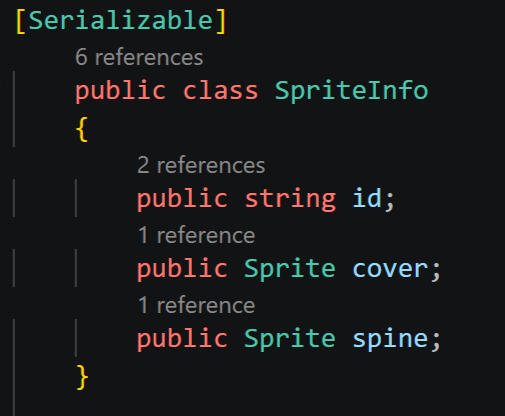
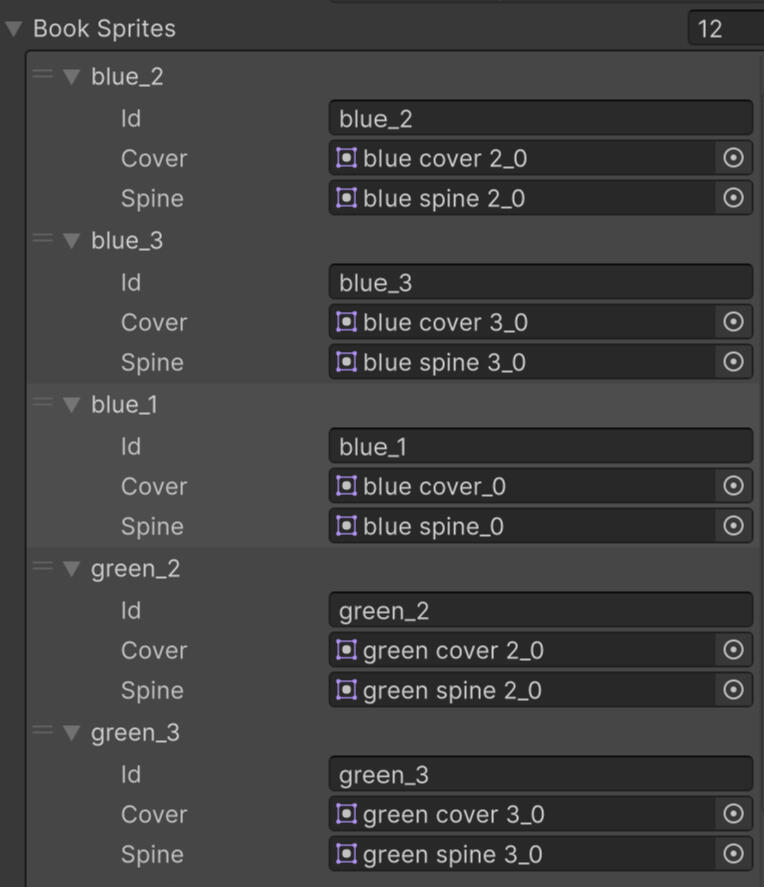
In the case of the sprite manager, which stores the book covers and spines, this also allows for the matching cover and spines to be easily grouped together.Before the ID and manager system was implemented, covers and spines were stored in seperate carefully ordered arrays; after randomly assigning a cover, it would find the spine that was at the same number in the array. For example, if the cover was the third sprite in its array, it would find the third sprite in the spine array, relying on the lists being in the same order.This opens up oppertunity for error, as if anything in the list is even accidentally bumped into the "wrong" order (the matching spine being at a different number in its respective list) it will immediately throw off the accuracy of every sprite.The grouped data simplifies the randomising and assigning process, while also allowing both sprites to be stored under one ID (as opposed to a seperate cover and sprite ID).
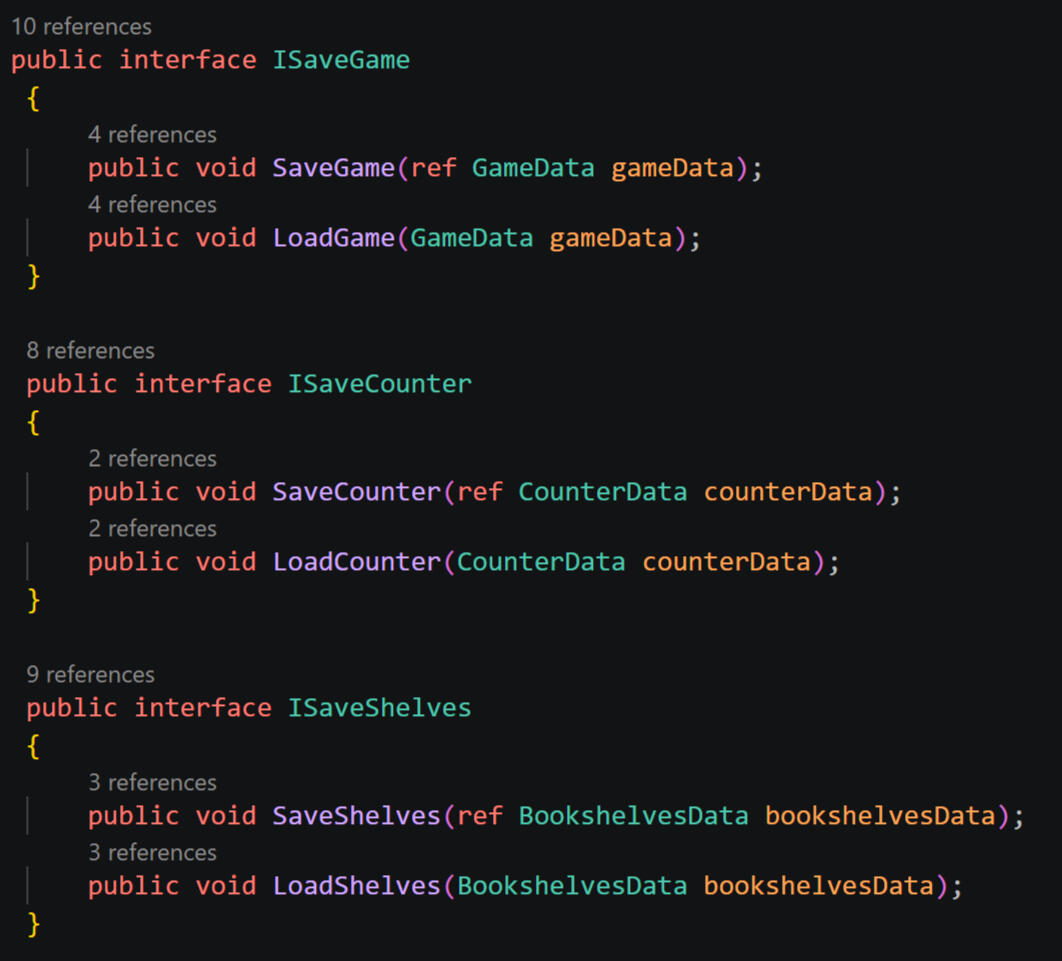
The system utilises seperate interfaces for each kind of save data that allows the save manager to locate and link all necessary data within the scene.
Saving
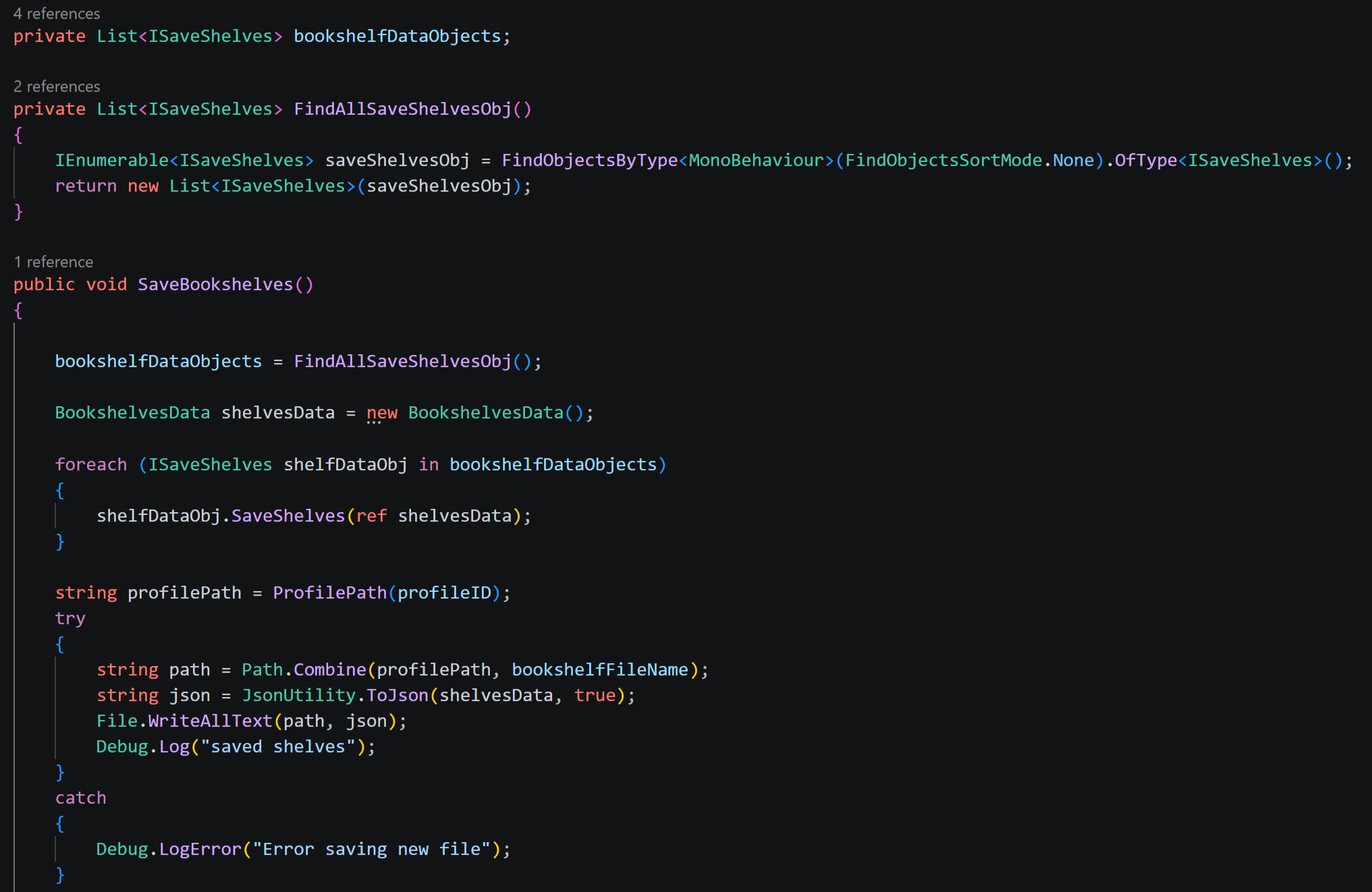
Example of Save Class within Save Manager - Saving Bookshelf Data, triggered when leaving bookshelf scene:
Finds all objects that utilise the relevent interface - in the case of saving bookshelves, objects utilising the iSaveShelves interface
Triggers the relevent function within that interace - triggers the save function, which connects relevent data back to save data
Writes the collected data to a JSON file
Example of Save Class within Interface - Saving Book Info:
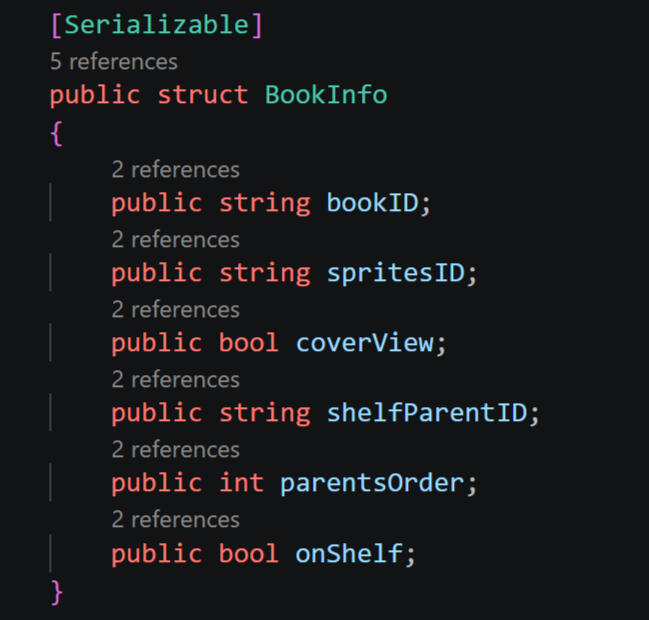
Data for individual book gameobjects are stored within a struct. This ensures that data stays grouped together and each book's information is decipherable from one another.For example, if all sprites in the scene were stored in a list, the game would not be able to rebuild the scene as it was, as it would not be able to decipher which sprite belonged to which book, or where said book was placed, etc.The struct ensures that all necessary data stays within its respective gameobject, allowing the scene to be rebuilt exactly how it was.
Class on bookPrefab script (responsible for randomising and storing book info after prefab is instantiated into scene). On save, will trigger class on every active book in scene.
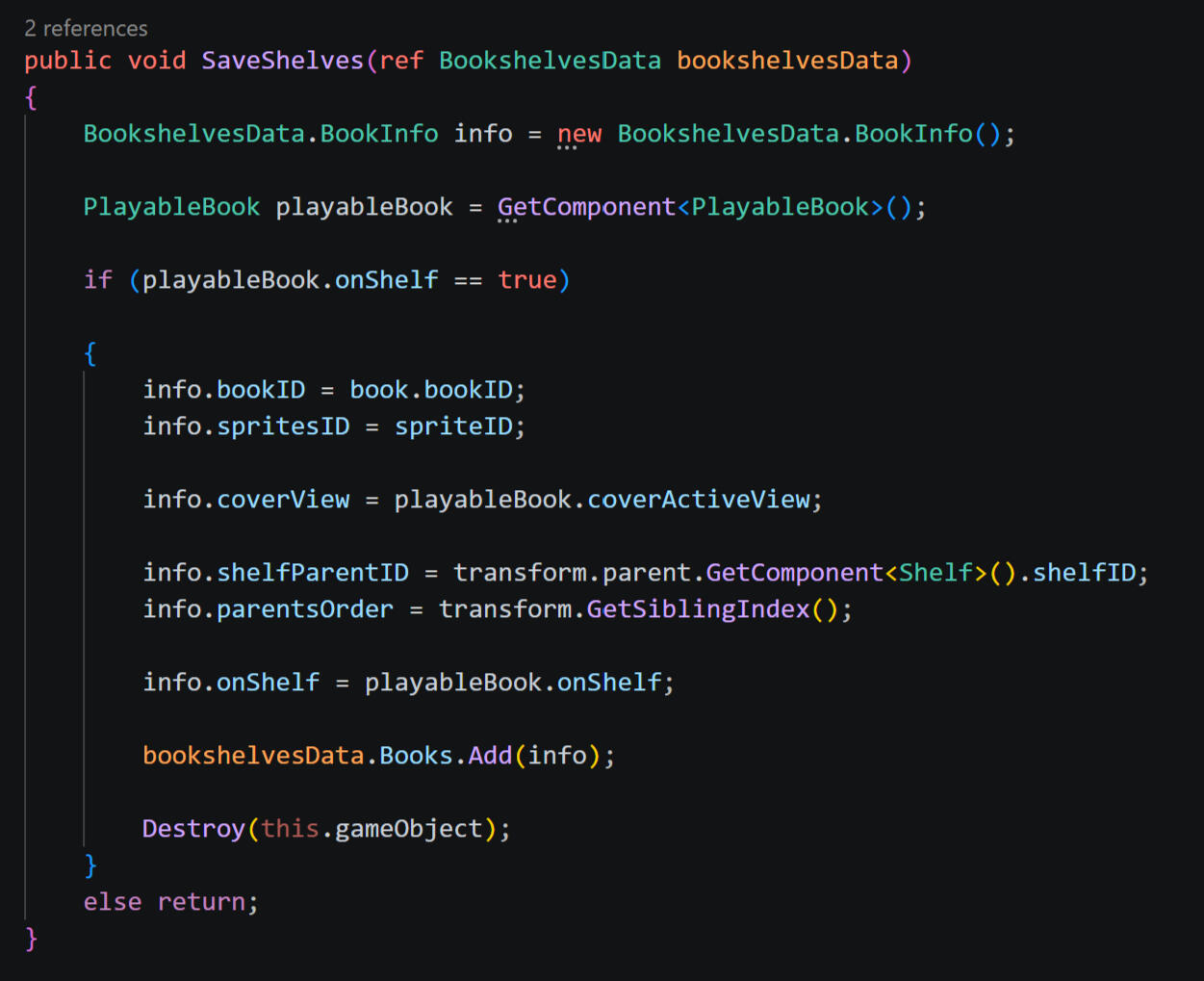
First ensures book is on a shelf avoids any conflicting saving with the book that is getting recommended to the customer, which should not be saved within this group
Creates new BookInfo Struct (a new group of data is created for each book in the scene)
Assigns data from the gameobject to the struct information
Add grouped data to list containing all books within scene
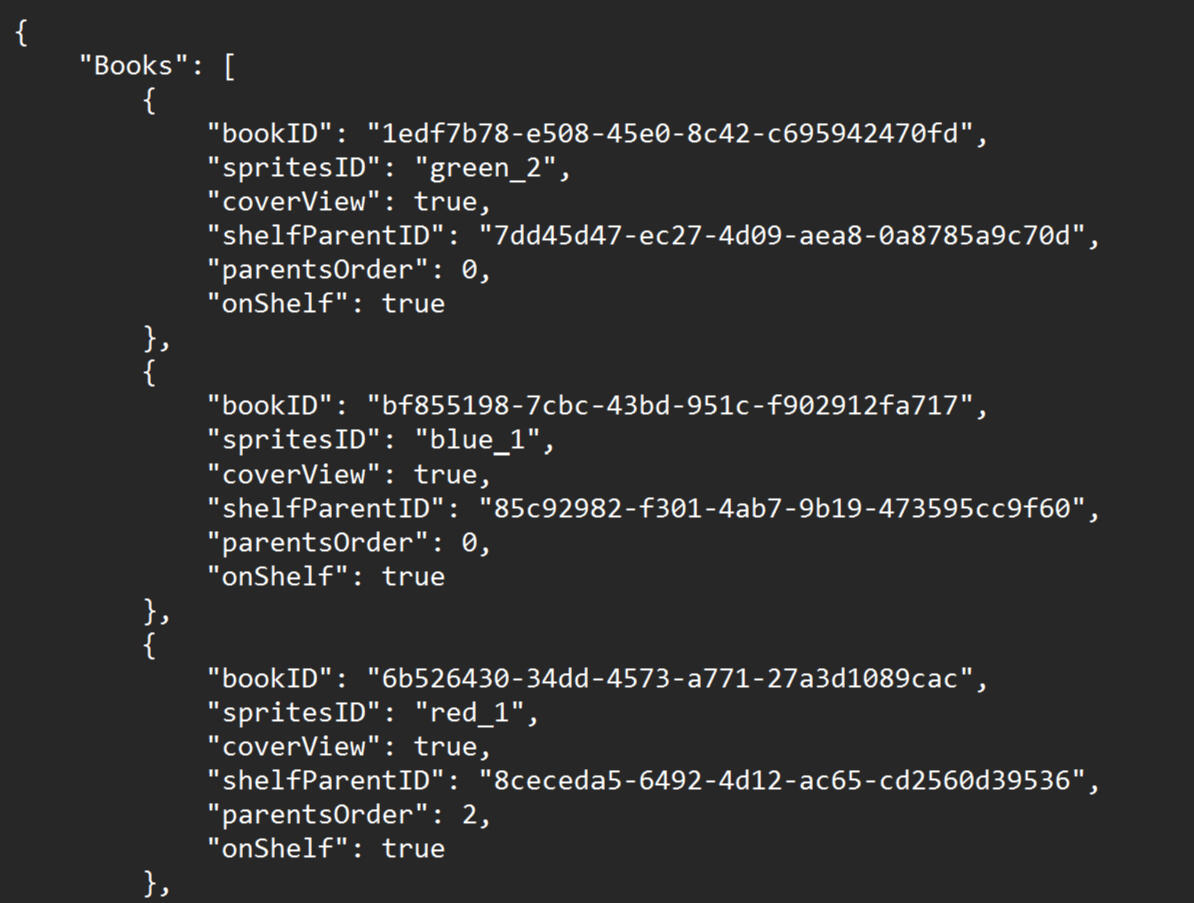
Example of how books appear in save data file:The list contains every book within the scene, and each bracket is the grouped data correlating to one specific book.
Loading
Loading Example - Load Bookshelves
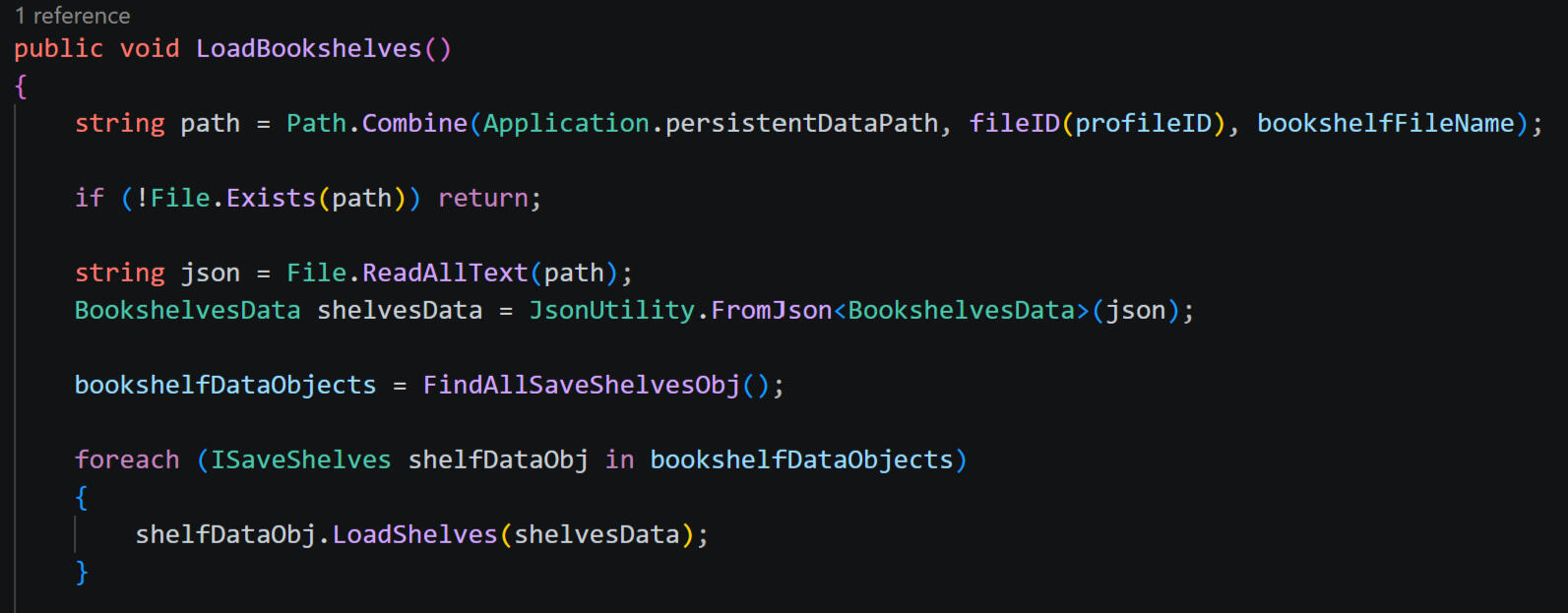
Finds save file and converts JSON file back into usable save data
Finds all objects that utilises relevant interface, and trigger class - finds all iSaveShelves objects and triggers LoadBookshelves class.
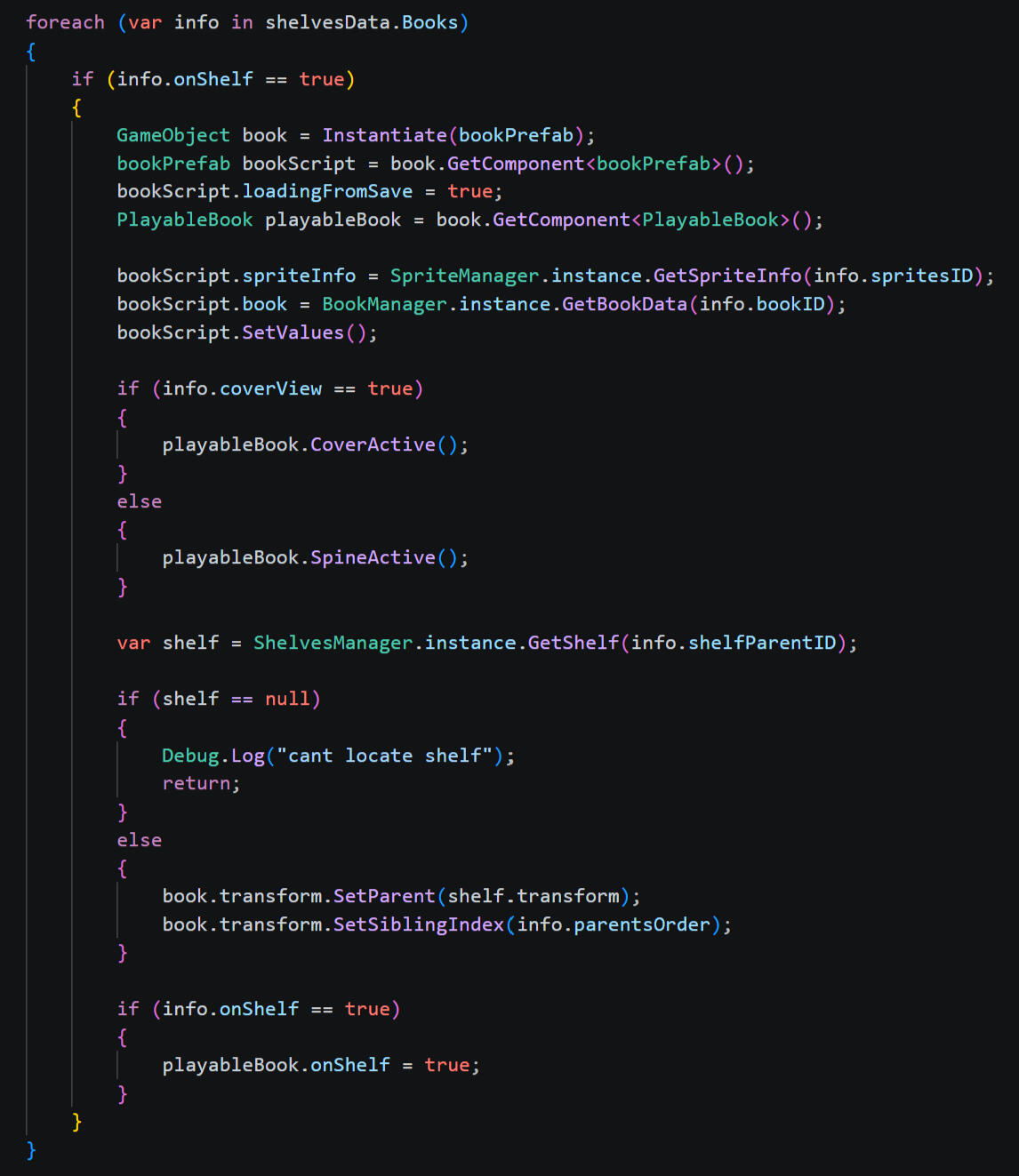
In the specific case of loading bookshelves, this is slightly more complex than the other scenes. In most scenes, the objects with the relevent loading class on them will still be active and can fill in the relevent data from the save file, however the loading function on the books will not be able to trigger as the books need to be created from the save data, and the loading function for each book will not exist when the book objects don't exist. Thus, the save manager is responsible for re-instantiating books on load.
Goes through each book (group struct of data that represents one book) from list of books that need to be readded to the scene
Instantiates a new book prefab (base book gameobject) and assigns data (bookData, sprites, etc) from grouped info
If book was set to spine view before save, sets book to spine view, and vise versa for cover view
Parents book to respective shelf, and reinstates position in parents order (ensures that books are in the same order on shelf)
Full Game Save
When navigating between the counter and bookshelf scenes, data is only written to counter and bookshelf save files. The only time the master game save data is used or updated is at the start and end of a day cycle.
Save Game: Triggered at end of day when either the 'Next Day' or 'Save & Quit' buttons are pressed.
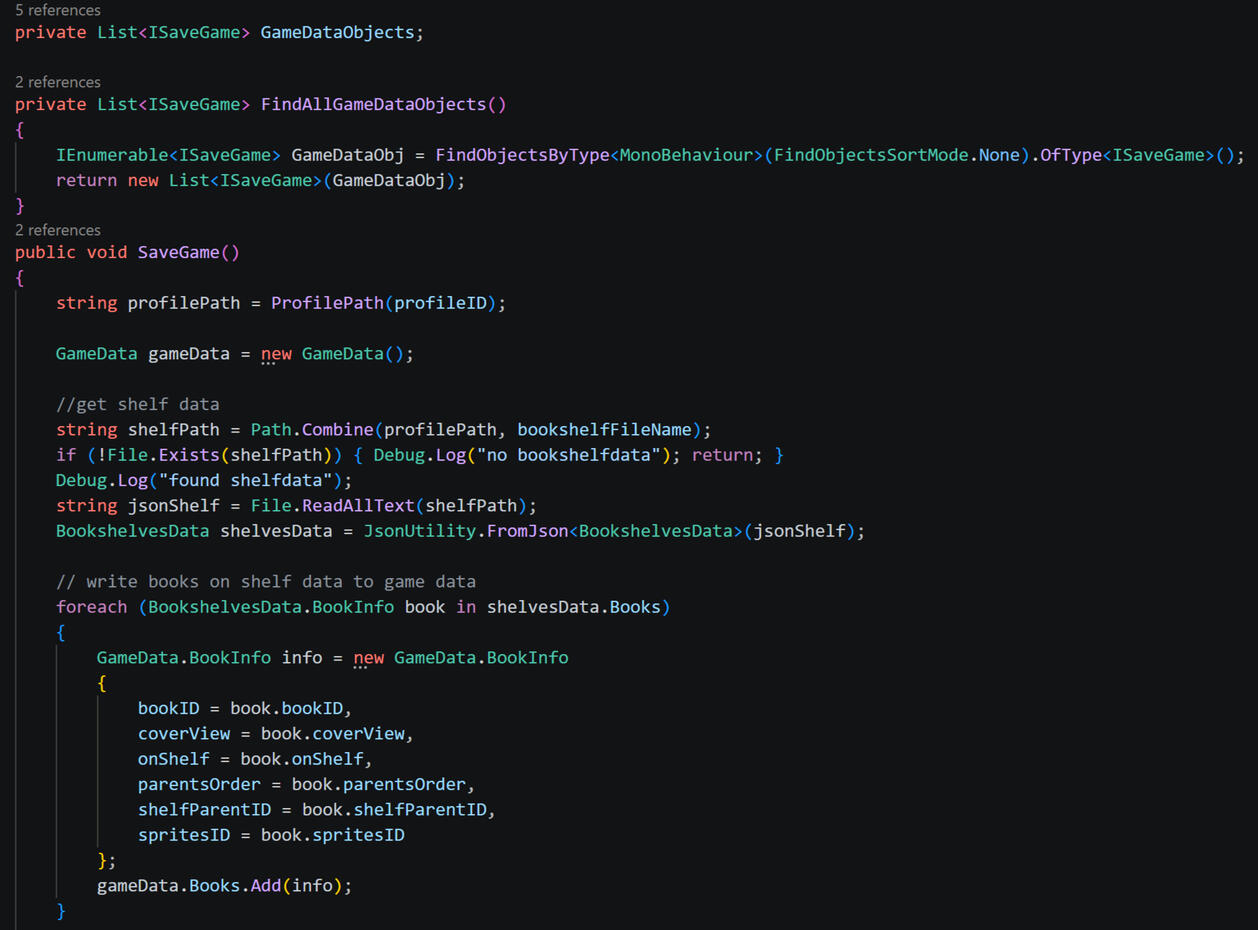
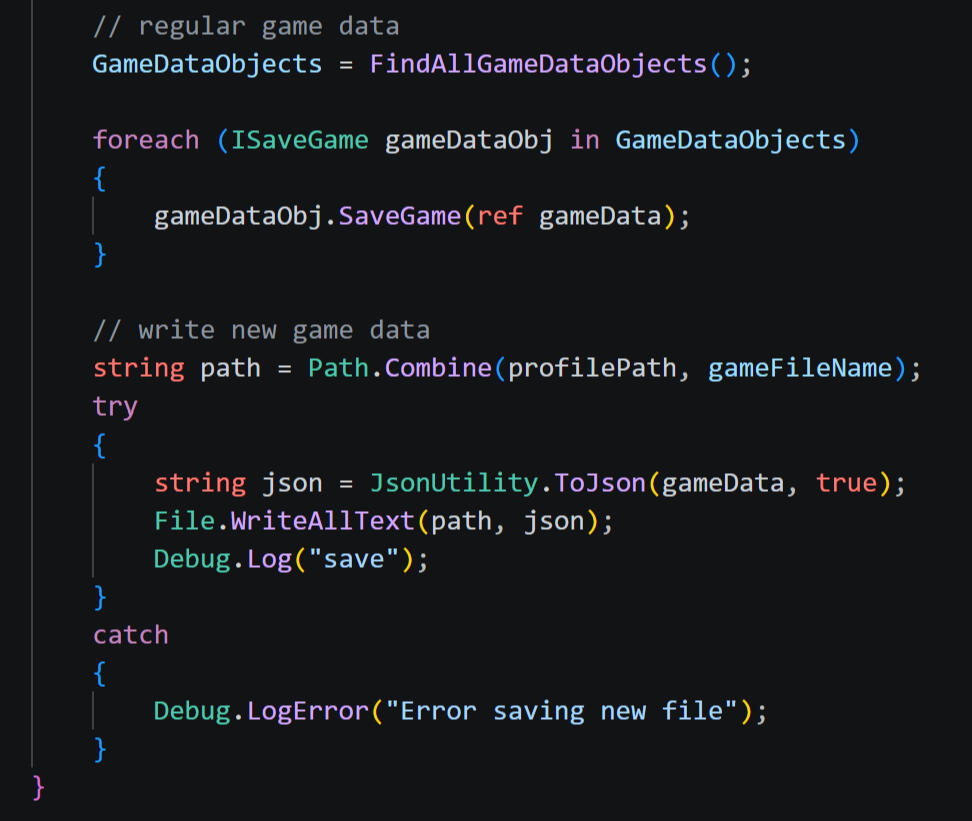
Game data utilises the same system as previous save files: finding all objects with the iSaveGame interface and executing the SaveGame class.However, unlike previous saving contexts, not all objects and scripts that need to be saved will be active when this class is triggered, which will not allow them to be saved. For example, due to the day cycle, save game should always be triggered while the counter scene is active, meaning that nothing in the bookshelf scene will be saved, as they would not “exist” when the save class is triggered.To overcome this, the save game function accesses and reads the last bookshelf data file, adding relevent data into the game save from the bookshelf file rather than acessing from the scene or objects themselves.The game data is then written to a JSON file as normal.
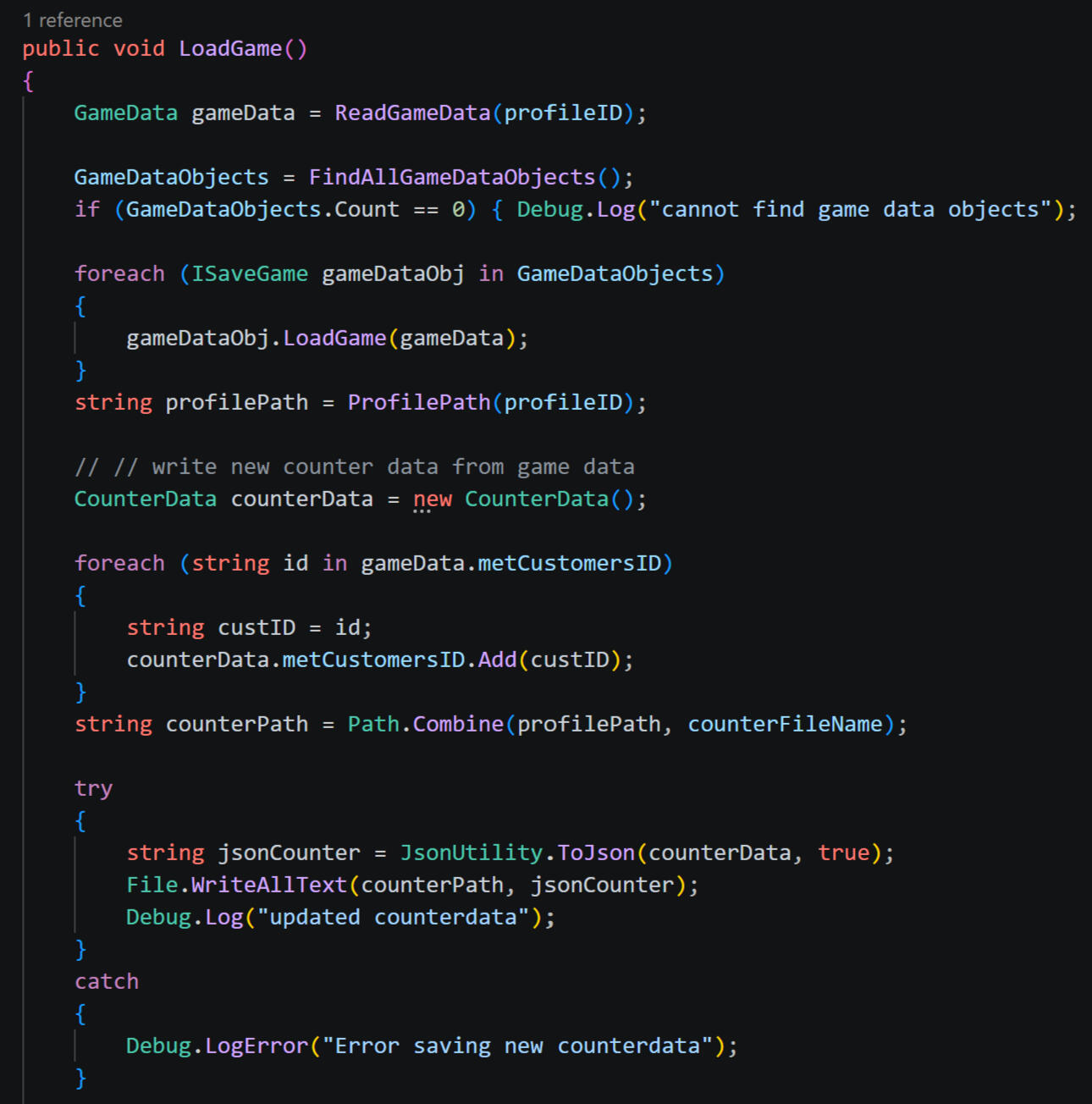
Load Game: Triggered at the start of each day.
Using the same method as previous loading systems, the game data JSON file is read and converted into usable game data.
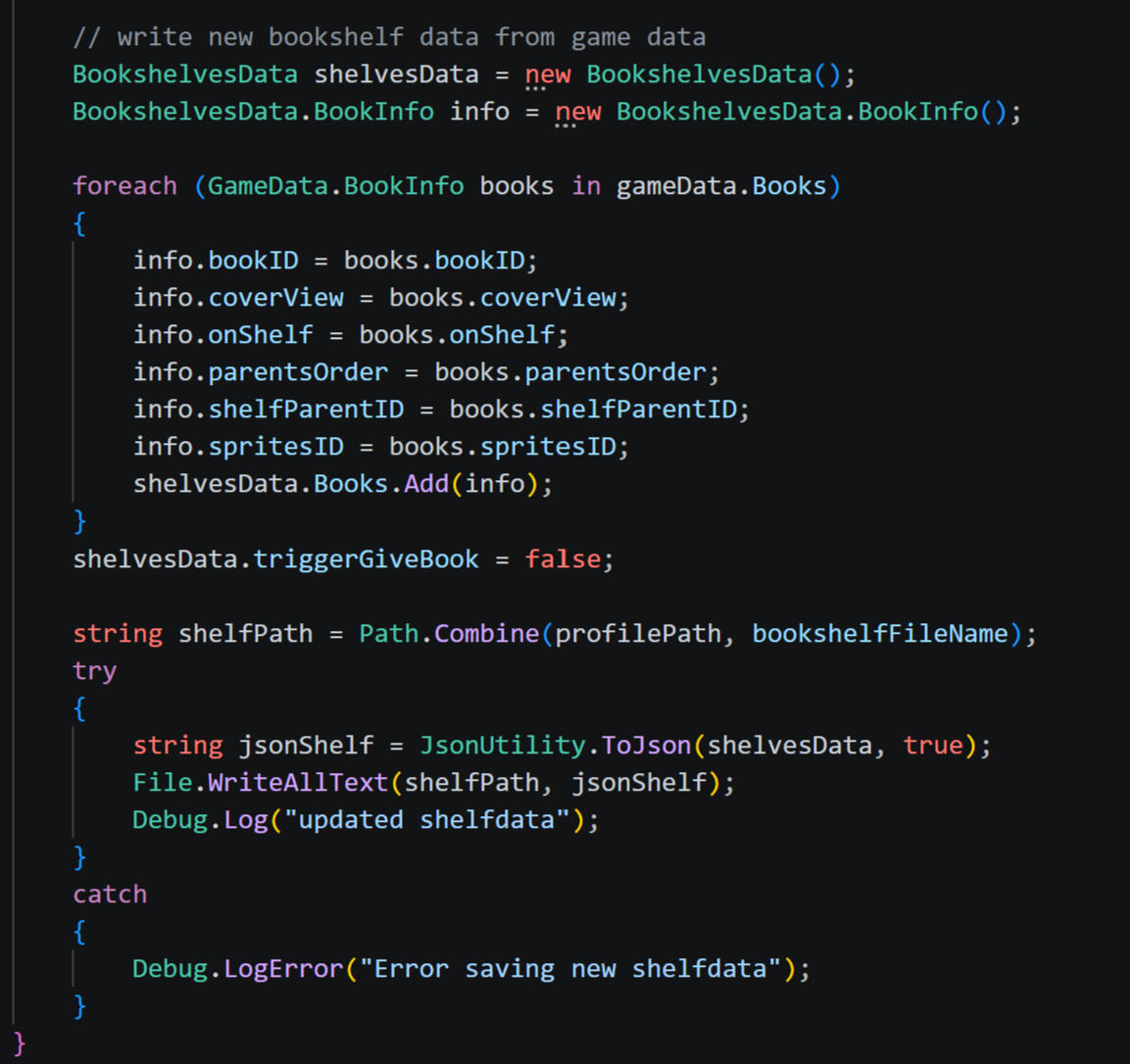
Uniquely, new counter and bookshelf data files are created and written based on the game data. This is for a few reasons:
If the game is quit midday before full game save is written, there will be existing counter and bookshelf data files that will create conflicts. For example, if books have already been put on shelves and the shelf data has already been written to file, the books will still be saved and reloaded even if that day is technically reloaded from the start. Resetting all save data files ensures that any data that was not written to the full game save will be reset and cannot interfere with the game.
Simplifies scene saving and loading. Coordinating when each scene should load from save data or its shelf/counter data creates unnecessary confusion within scripting. With the files rewritten, scenes can load from their respective data every time.
Not all gameobjects and scripts will be loaded at one time. Since the data is spread across multiple scenes, only some scripts will be active and able to execute the Load Game function when triggered (thus, any inactive scripts will not recieve their needed data). This removes this issue, as data will be loaded alongside its respective scene as normal.
Multiple Save Files
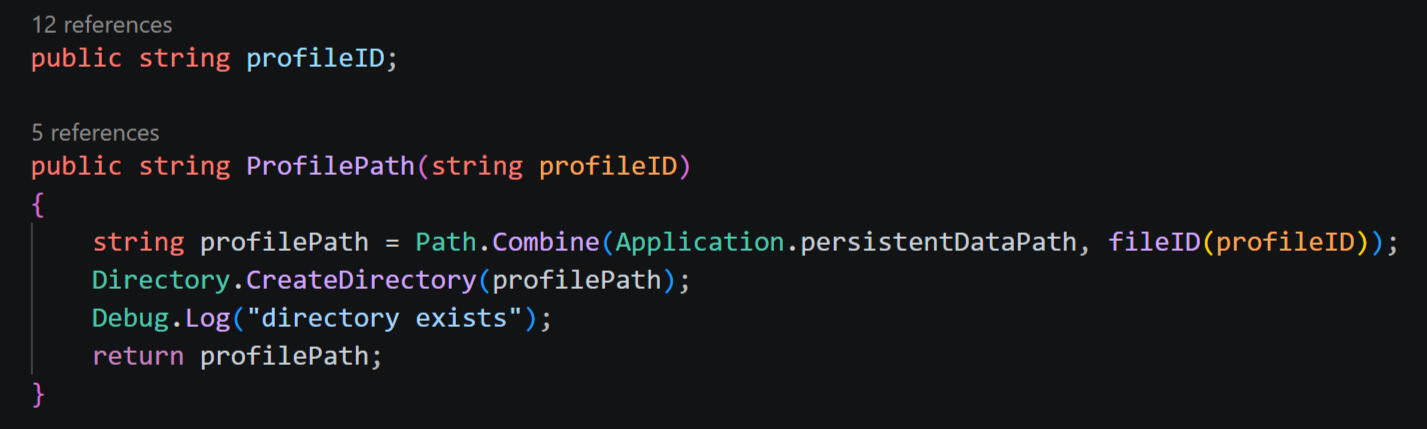
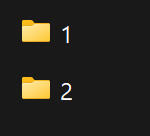
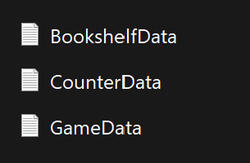
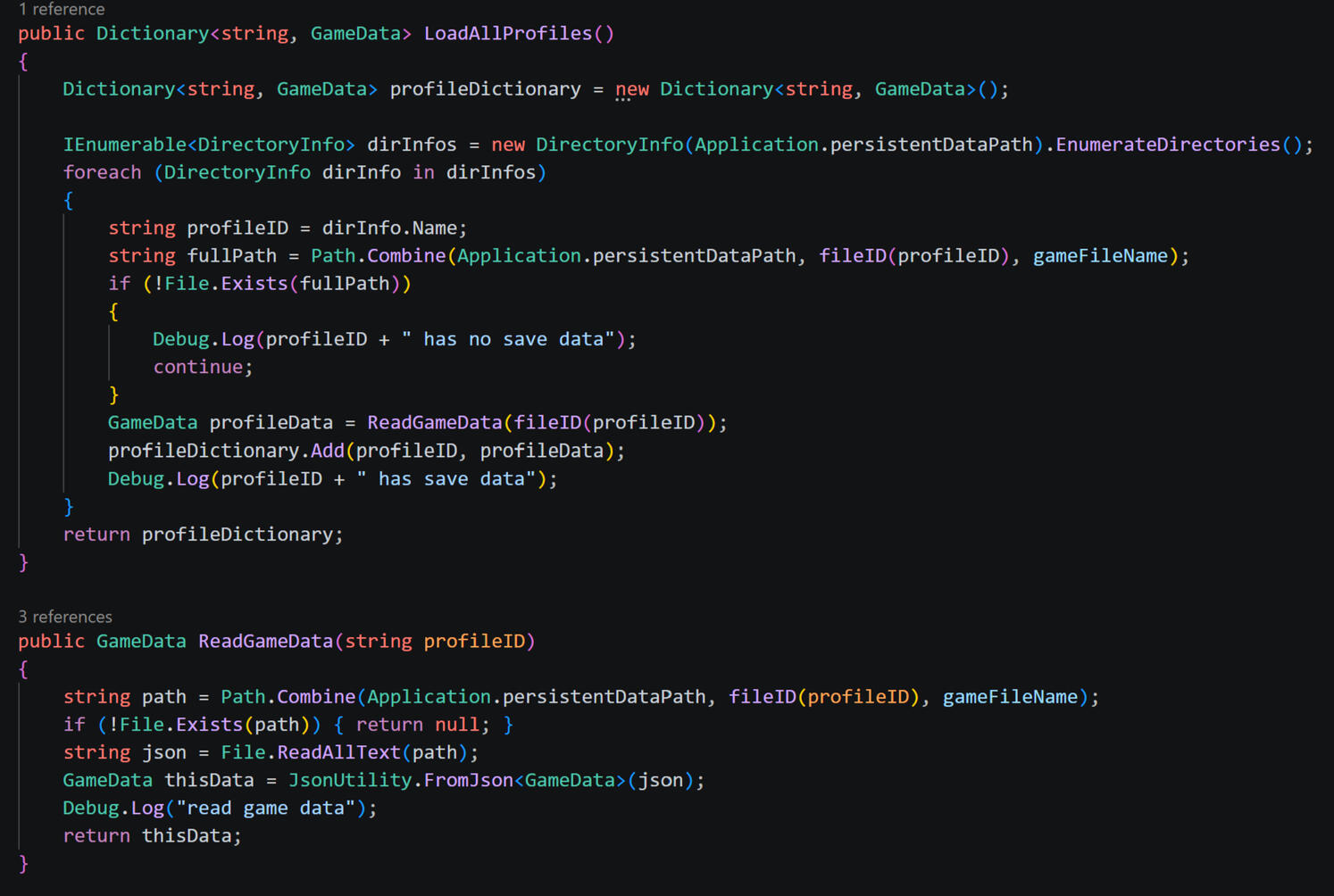
Each save profile is seperated into a folder, titled by its profile ID (1-3). The bookshelf, counter and game data for that save profile is written and stored within that folder.
Load Menu:
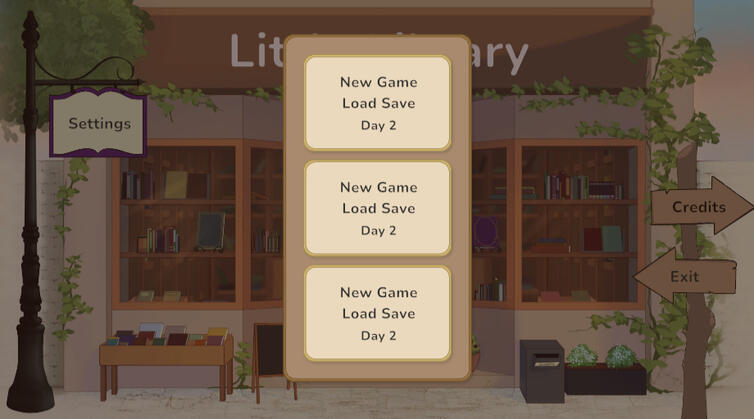
Each save slot in the menu is assigned a profileID (1, 2 or 3). When the load menu is opened, the profile (folder) correlating with each profileID and detects whether:
The profile exists (folders for each profile are only created when the game is loaded in that slot, so if slot hasn't been used yet, profile folder will not exist)
The profile contains a full game save file
If there is no profile found or no game save within the folder, the slot button will display 'New Game' text, and pressing will begin a new save from day 1.If the profile and game save is found, it will display as 'Load Save', and read said game data to display what day the save is up to. When pressed, the game will load the next day from whichever day was last completed in the game save.
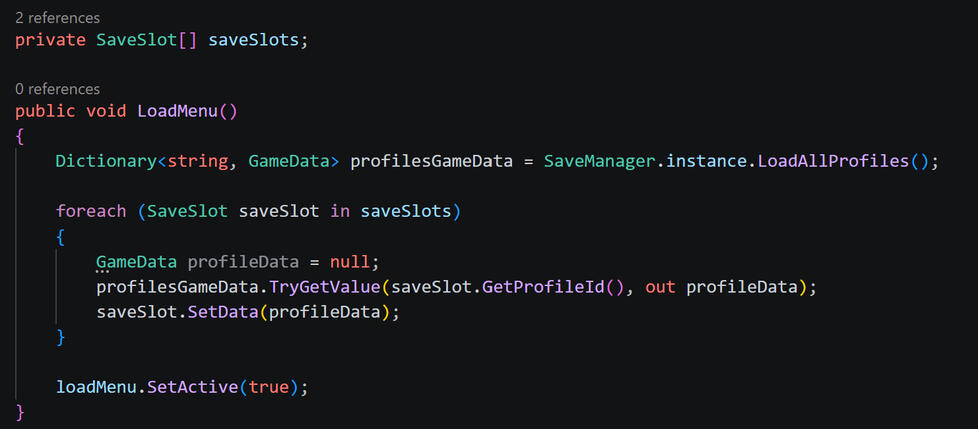
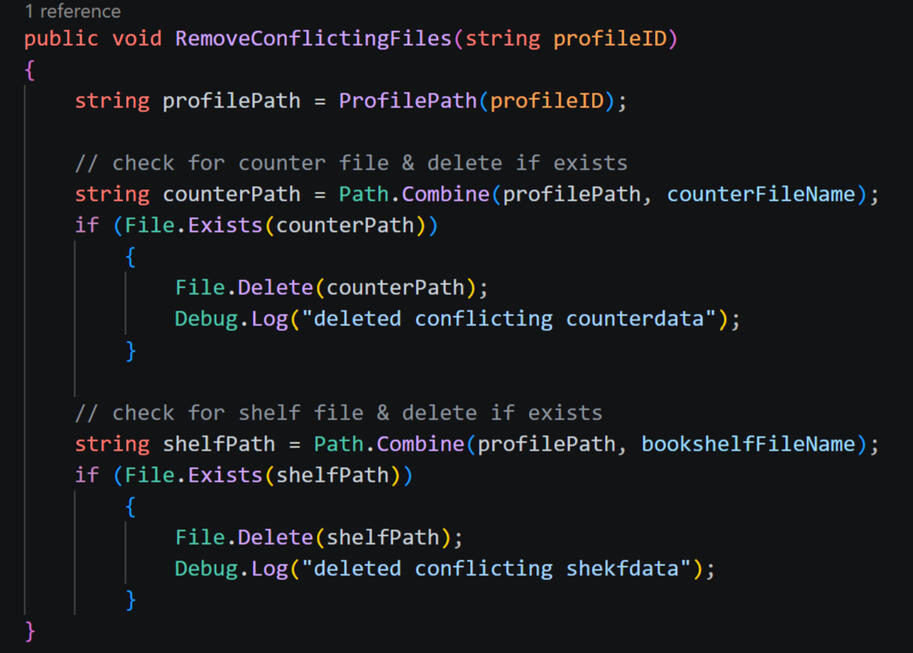
To avoid conflicting counter and bookshelf data*, as previously mentioned, when a new game is started, the selected profile is checked for any counter or bookshelf files, and deletes them if any exist.
As can be seen in the save & load example scripts shown above, each time any game, counter, or bookshelf data is saved or loaded, the profileID of the save actively being played is referenced, ensuring the save manager is only handling files within that profile's folder.
*Since the game only saves and loads from the start and end of a day, if the game is quit during day 1 (before a full game saved is ever established), bookshelf and counter save files could exist and will not be overwritten on game load as they typically would if a game save was present. Since a full day has not been completed, and there is no game save, the profile will still register as empty despite "part" of a day being completed & potential counter/shelf save files existing. Therefore, it is crucial that any conflicting data from partially completed days be wiped, since it is loading the profile as if it were a completely blank save.
The Lady Carmilla
Details will be updated alongside further development.
Last updated: 06/05/2026
The Lady Carmilla was inititally created as a university project that required conceptualising a walkthrough for an original game. Much like Little Library, the game was born out of a deep passion for gothic horror and the queer history of vampires - a topic that has wormed its way into several of Marceline's projects and essays.Inspired by the gothic tale of Carmilla and the atmospheric gameplay of Resident Evil: Village's Castle Dimitrescu, the game follows the first person POV of Laura, a young woman who wakes up disoriented in a vast, haunting gothic cathedral. As she explores her unfamiliar surroundings, she begins to uncover some dark secrets. What happened to this place? Or who?Can Laura uncover the truth? Or will she die trying?
Moodboard
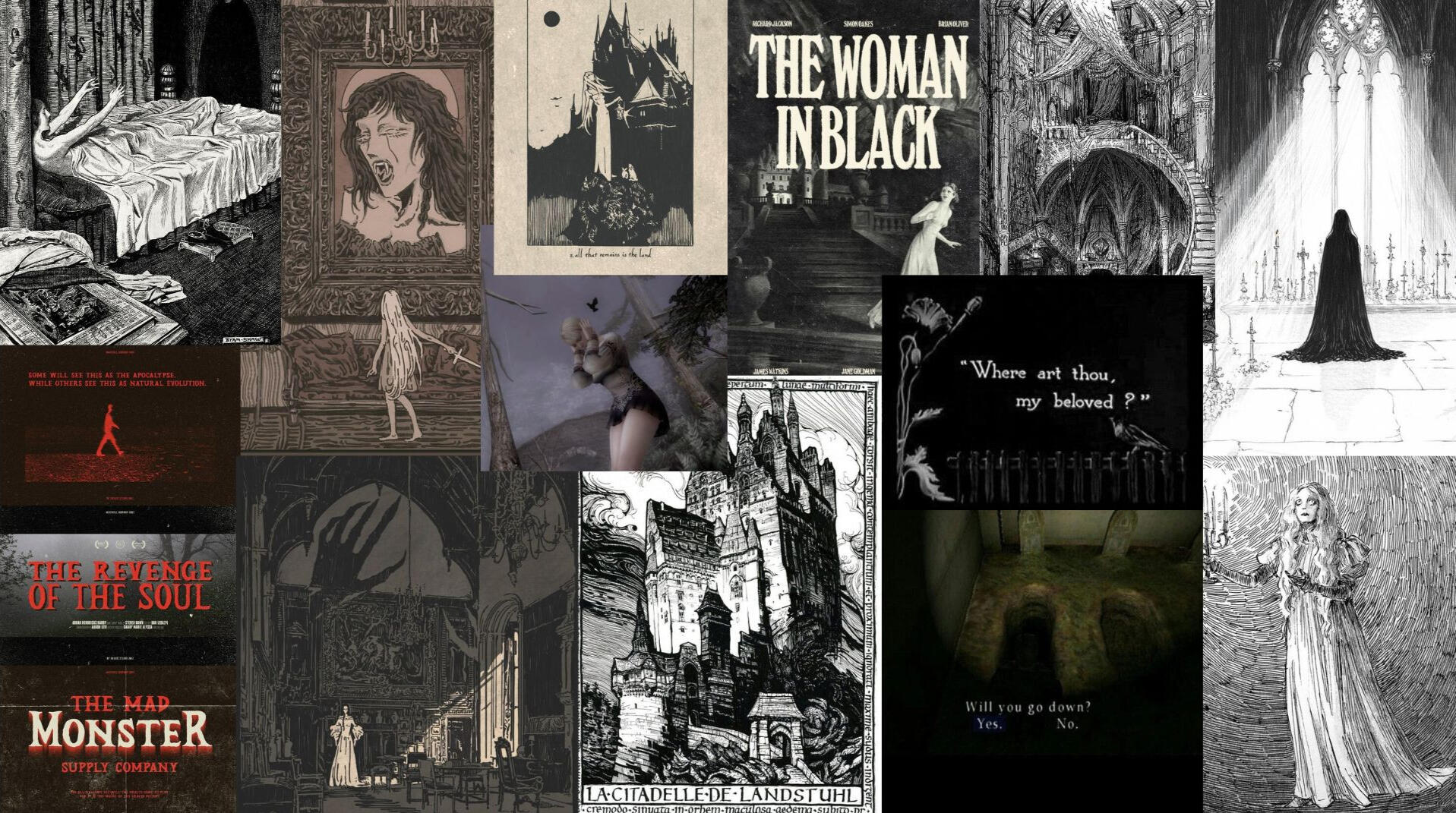
The game consists of two main visual styles: retro PSX horror (Silent Hill, Fatal Frame, etc.), alongside 2D black & white illustrations (as pictured above).
Since creating the presented walkthrough, and as the concepts have developed further outside of the original project, numerous details have been changed. Notably, an additional narrative has taken shape, drawing inspiration from another gothic classic, Mary Shelley's Frankenstein. Thus, the below walkthrough should be interpretted as a snapshot or "teaser" into the overall atmosphere and tone of the game, and not necessarily reflective of final narrative or gameplay.
home
Select images for enlarged view.
Ignite Choir
2026 Concert Posters.


Ignite Choir
Soloist Announement Posts - Home Concert (May 2026)
Following the "rock" aesthetic, soloist headshots were made to look like photobooth photos with props, etc. Posts were themed both around the rock and photobooth aesthetics, while maintaining matching themes to the concert's poster.


Out of Touch
Short motion graphics MV created in Adobe After Effects.
Orbit
3D Graphic short film created in Adobe After Effects (inc. all visual graphics)

Meal for Two
Rotoscope animated short film, created in the style of Studio Ghibli.
Additional past projects to be added.
home